Tourists can register Alipay with an overseas mobile number before arriving in China and add an eligible international bank card. Shanghai’s September 2026 municipal guide documents this route, including an English interface. A mainland phone number is therefore not a prerequisite for the basic registration process described in that guide. Card eligibility and successful payment remain separate checks. [S1] (english.shanghai.gov.cn)
The practical goal is not simply to create an account. It is to reach a point where you can pay a merchant, understand the charge, and switch to another method if something fails. The preparation and troubleshooting suggestions below are an editorial checklist, not a promise that every card or merchant will work.
Set Up Alipay in 4 Steps
If Alipay is already installed, start from the step that matches your current state.
- 1Register your Alipay accountUse your mobile number and confirm you can return to the account.
- 2Add your overseas bank cardLink your own eligible card and follow any issuer prompts.
- 3Complete any requested identity verificationFollow only the prompts shown in your app, with your passport ready if requested.
- 4Make a small merchant payment to confirm it worksTest before an urgent or large purchase, then check the transaction result.
Card linking and successful payment remain separate checks; setup does not guarantee that every card or merchant payment will work.
Before you begin: six decisions
- Prepare registration and card linking before you need an urgent payment.
- Keep registration, verification, and successful checkout separate in your checklist.
- Review the live fee and total.
- Distinguish merchant purchases from personal transfers.
- Carry a usable backup rather than relying on one app.
What to prepare before starting
Prepare your phone, your own bank card, and your passport. Alipay’s published international-card agreement describes requests for cardholder and card details, with identity information supplied according to the page prompts. It also requires the user to be the cardholder. Use accurate personal information rather than someone else’s credentials. [S3] (cschannel.alipay.com)
As a preparation checklist:
- Keep access to the number you intend to register.
- Make sure you can contact your card issuer while traveling.
- Have your passport available if the app requests it.
- Decide on a backup payment method.
- Allow time to resolve a problem before your first essential purchase.
Do not make your first attempt while a queue is waiting or a transport departure is imminent. That is a planning recommendation, not a published setup-time requirement.
Choose your payment route
Alipay is not the same product as Alipay+. Alipay is a payment app; Alipay+ connects participating wallets and payment methods across borders. Some travelers can use an existing home wallet instead of opening a new Alipay account, but they must check that wallet’s supported destinations and participating merchants. [S8] (alipayplus.com)
| Your task | Route to consider | What to check |
|---|---|---|
| Prepare an app for mainland merchant purchases | Alipay linked to an eligible overseas card | Card linking and issuer authorization |
| Keep using an existing home wallet | A participating Alipay+ wallet | Mainland support and merchant payment logo |
| Pay directly with a physical card | A merchant accepting your card network | Acceptance at the actual checkout |
| Recover when an app payment fails | RMB cash | Access to an appropriate ATM or exchange outlet |
The table is a decision aid, not an acceptance guarantee. Alipay+ describes participating-wallet checkout, while Bank of China advises visitors to check card-network logos or ask the cashier about physical-card acceptance. The bank also documents cash withdrawal and exchange options. [S7–S8] (boc.cn)
Step 1: Download and register Alipay
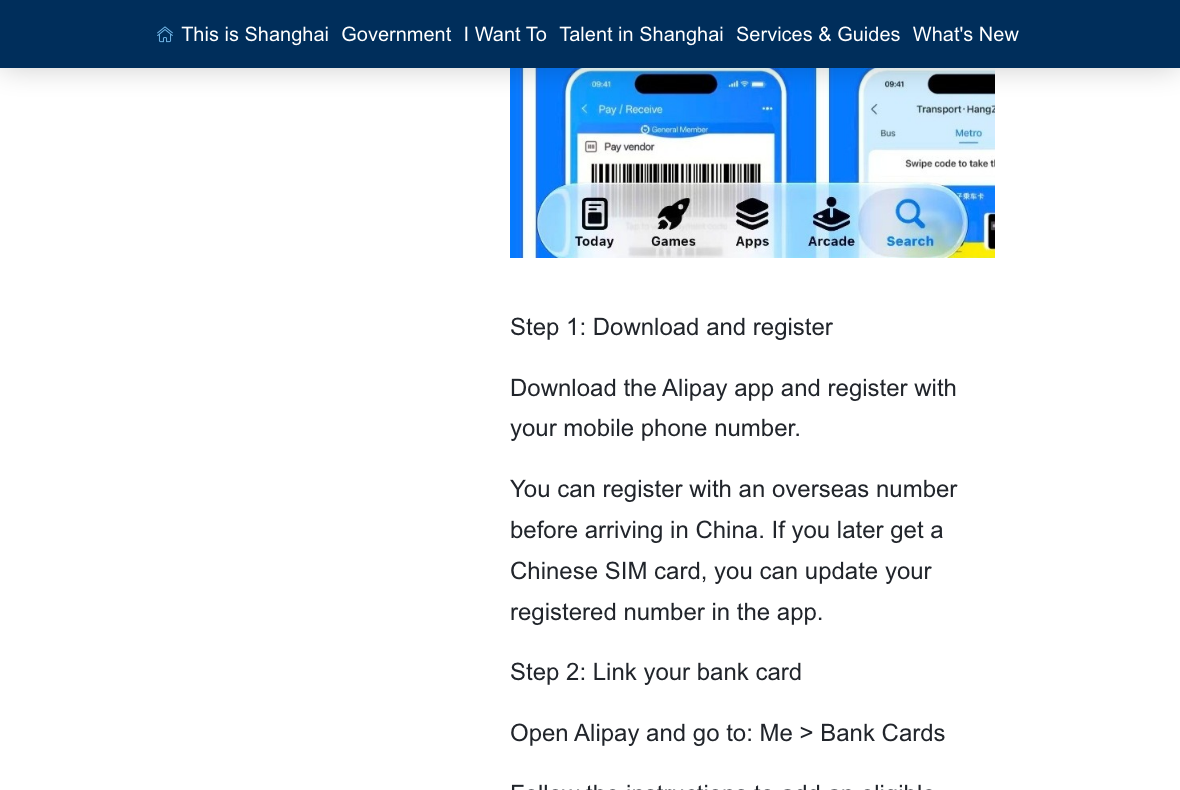
Official Shanghai municipal guidance, photographed October 11, 2026 from the public webpage—not an authenticated Alipay app session. Official source.
Download the Alipay app and begin registration. Beijing’s official illustrated guide shows selecting the phone-number area code, entering the mobile number, and using the international version. Treat those illustrations as examples of the workflow, not a guarantee that today’s buttons have identical wording or placement. [S5] (english.beijing.gov.cn)
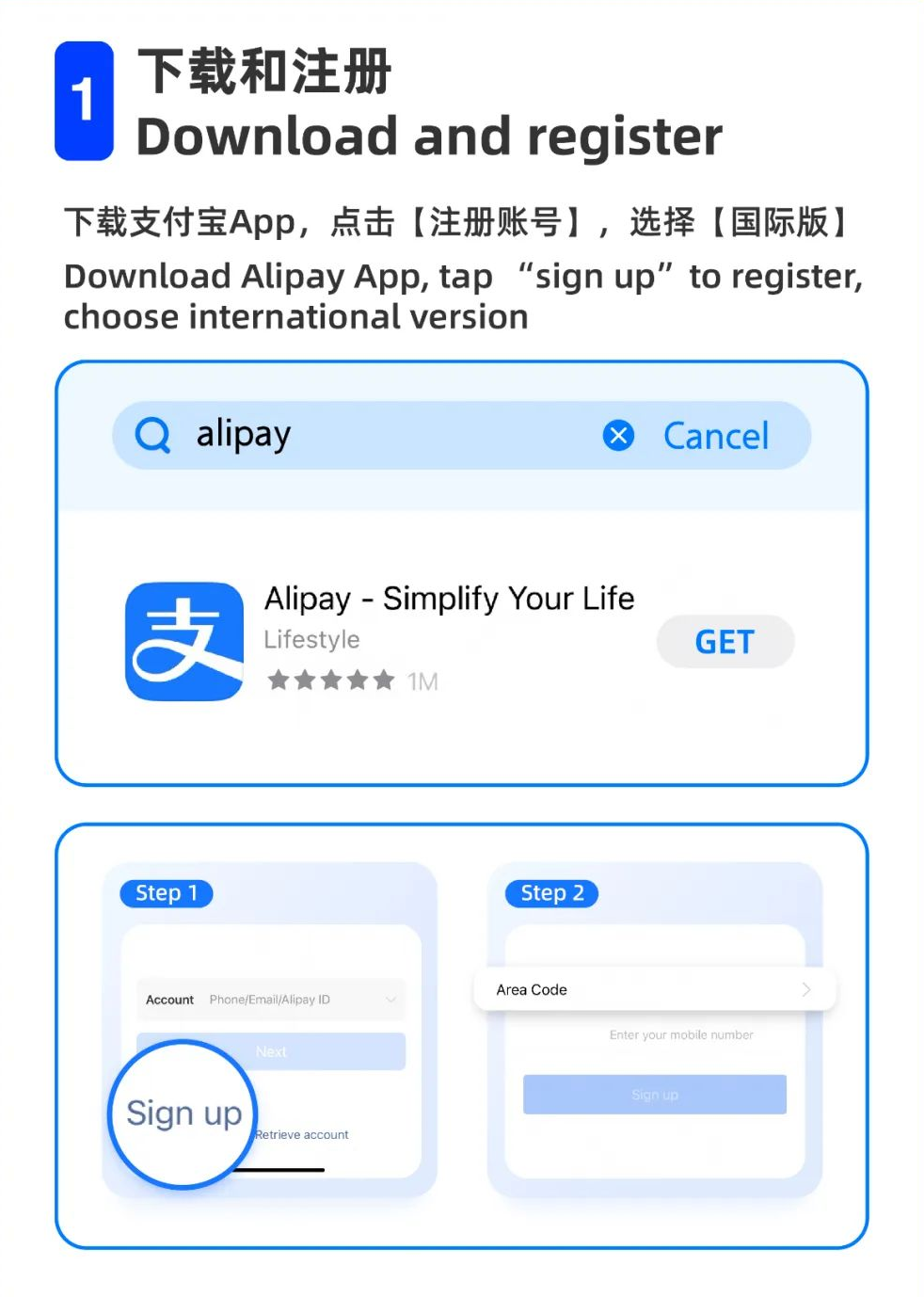
Follow the verification instructions actually displayed on your device. For your own preparation, confirm that you can return to the account after registration rather than assuming the initial sign-up screen proves everything is finished.
Step 2: Add your overseas bank card
Look for the bank-card section. The newer Shanghai guide identifies Me > Bank Cards as the route and says linking depends on both the card network and issuing bank. Follow the requested fields on your own screen. [S1] (english.shanghai.gov.cn)
Do not assume an older list of accepted networks is complete. Beijing’s 2024 illustration displays Visa, Mastercard, Diners Club International, and Discover. Ant International subsequently announced American Express support on March 20, 2025. This shows why a dated screenshot cannot establish the complete current eligibility list. [S5–S6] (english.beijing.gov.cn)
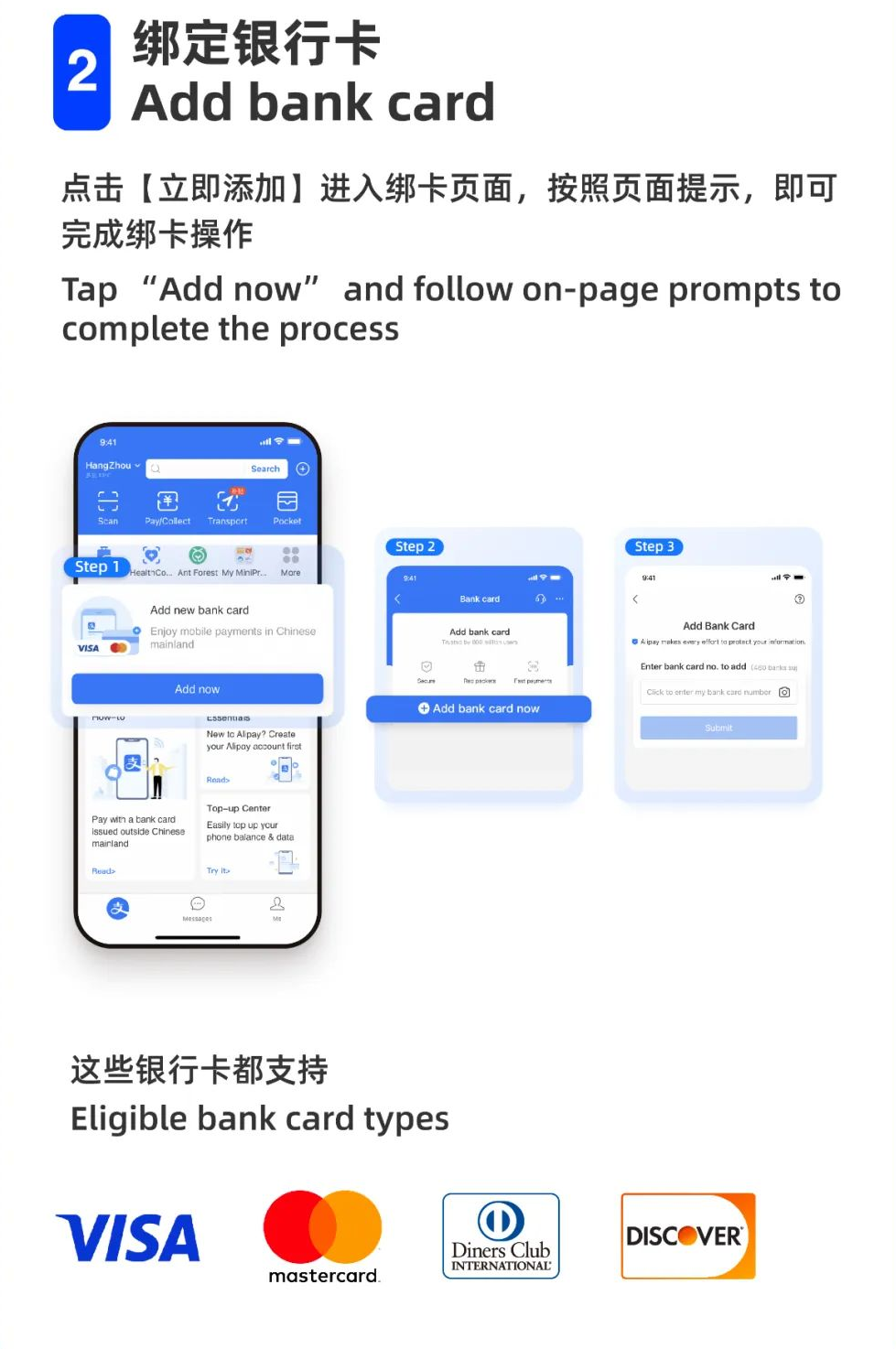
If linking fails, contact the issuer or Alipay rather than repeatedly changing personal details. The Ministry of Commerce’s guide explains that issuer authorization is needed and that some banks may reject a linking request. A supported network logo is not, by itself, confirmation that your individual card has been approved. [S4] (nsd.mofcom.gov.cn)
Step 3: Follow the identity prompts
Keep your passport ready and complete the identity checks requested by the app. Alipay’s published agreement refers to passport information before first card use, but its page carries a 2021 update notice. Do not turn that historical agreement into an unsupported claim that every tourist encounters the same current verification screen. [S3] (cschannel.alipay.com)
For your checklist, distinguish these milestones:
- Account registration completed.
- Card successfully linked.
- Requested verification completed.
- Merchant purchase successfully paid.
The distinction is useful because it prevents “I added my card” from becoming “all my travel payments are guaranteed.” Record any unresolved message and use official support to clarify it.
Step 4: Make a small first merchant purchase
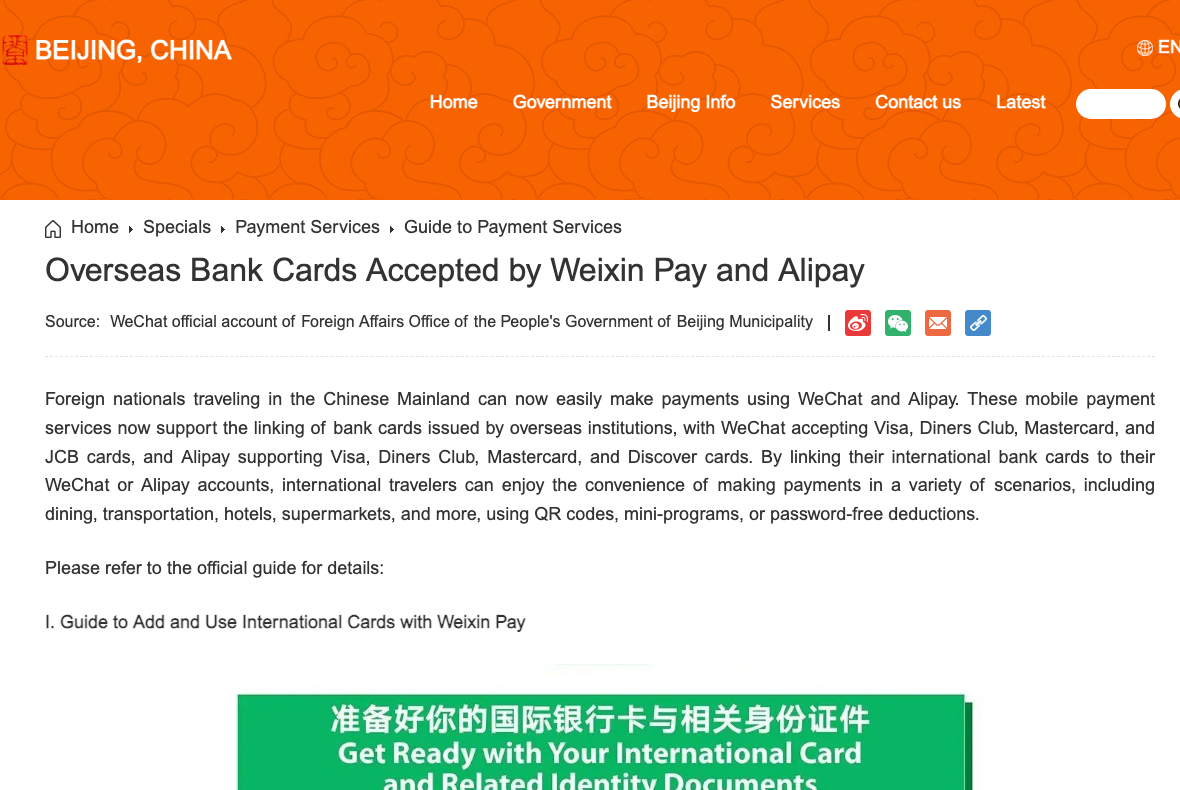
Official Beijing government visual guide to international bank cards and QR payment—not evidence of a successful test transaction. Official source.
Once in mainland China, consider a small, ordinary purchase before depending on the setup for a large or urgent bill. This is a suggested test, not an official activation requirement.
Beijing’s guide illustrates two checkout methods:
- You scan the merchant’s QR code using the app’s Scan function.
- The merchant scans your payment code displayed in Alipay. [S5] (english.beijing.gov.cn)
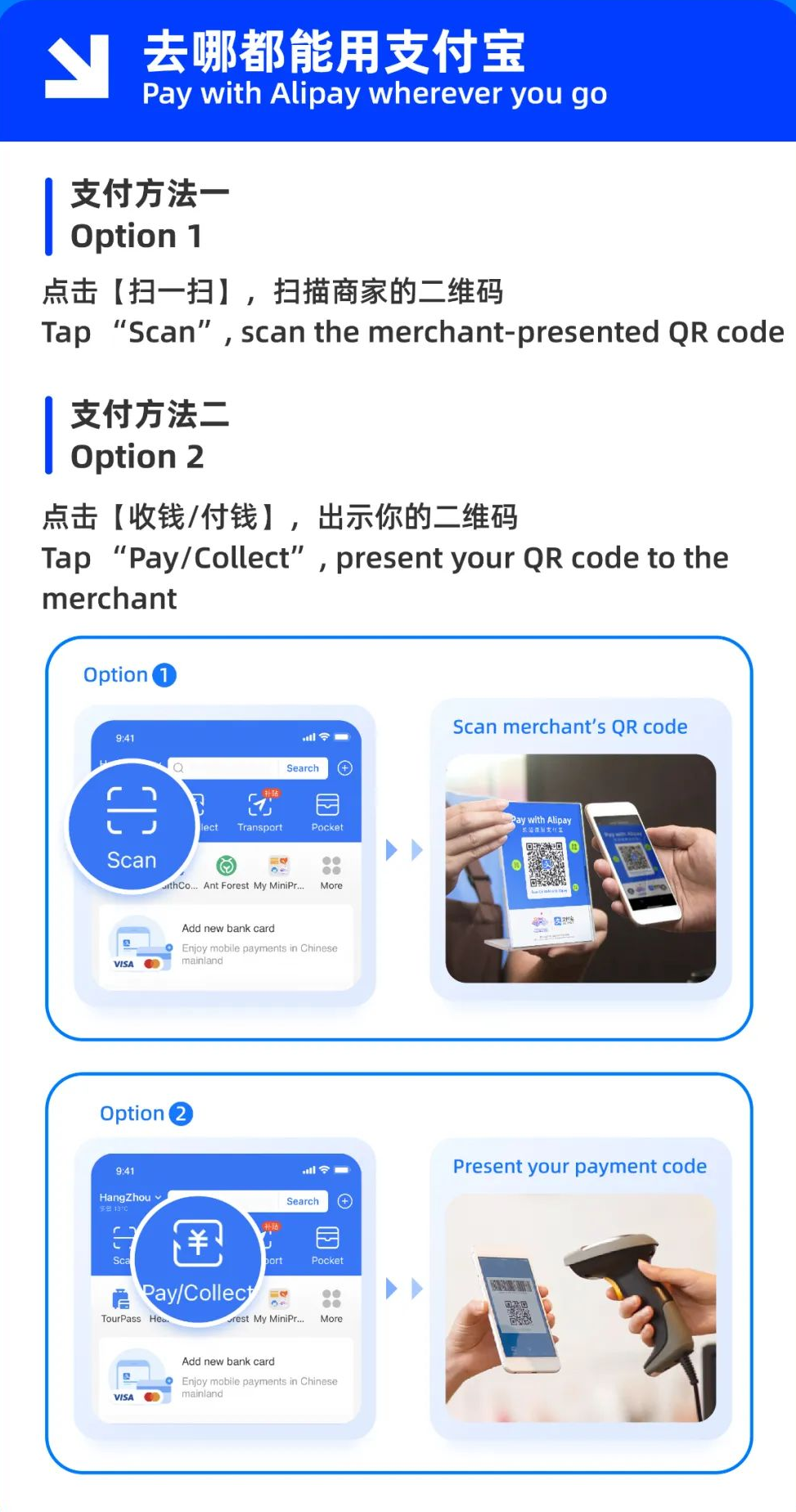
Before confirming, review the merchant, amount, selected payment method, and any displayed fee. Afterward, confirm the outcome with the cashier. If the result is unclear, check the transaction record before trying again; do not use a second attempt as a substitute for establishing whether the first charge succeeded.
Fees, currency conversion, and spending limits
The Ministry of Commerce’s 2024 guide states that linked international-card QR payments of RMB200 or less have no additional platform service fee. Above RMB200, it specifies 3% of the transaction amount. Under that published wording, exactly RMB200 falls on the no-additional-fee side. These are dated published terms, not a guarantee of every account’s current fee or promotion. [S4] (nsd.mofcom.gov.cn)
Read the fee and total shown for your actual transaction. Alipay’s agreement says service fees may change and refers users to the service-page fee information. It also explains that conversion involves the issuer, card organizations, and cooperating institutions; the card statement records the amount charged in the card’s currency. [S3] (cschannel.alipay.com)
Shanghai’s payment guide, explicitly updated July 24, 2026, lists maximums of US$5,000 per transaction and US$50,000 per year for overseas visitors linking international cards to Alipay or Weixin Pay. Treat these as published ceilings, not an assurance that your account can spend that amount. [S2] (english.shanghai.gov.cn)
For a large bill, ask about the available payment channels before committing. Compare the displayed app charge with your issuer’s terms rather than assuming the wallet route is automatically cheapest.
Merchant purchases are not personal transfers
Do not confuse paying a business with transferring money to an individual. Alipay’s published international-card agreement limits this service to eligible mainland merchant purchases and excludes money transfers, wealth management, and cash withdrawal. Linking a card does not establish access to every function inside the app. [S3] (cschannel.alipay.com)
If someone asks for a personal transfer instead of a merchant checkout, pause and ask for another payment method. Do not treat an unsupported function as a setup problem that must be solved by handing funds or account access to a stranger.
What to do when payment fails
Use this troubleshooting order as a practical checklist:
- Read and save the exact error message, excluding sensitive information.
- Check whether the app is responding normally.
- Confirm the intended card is selected.
- Review any outstanding verification request.
- Ask the cashier which merchant checkout method is available.
- Contact the issuer if the message indicates a bank decline.
- Switch to your backup if the purchase is urgent.
For a physical-card fallback, Bank of China advises checking the relevant payment-network logos and asking the cashier when acceptance is uncertain. Its visitor guide also documents RMB withdrawals using supported overseas cards. [S7] (boc.cn)
Shanghai’s municipal guidance describes obtaining cash at suitably marked ATMs and exchanging currency at designated bank branches, qualified outlets, or self-service kiosks. Confirm the available currencies and your issuer’s conditions rather than assuming every machine or outlet is suitable. [S2] (english.shanghai.gov.cn)
FAQ
Do I need a Chinese bank account?
Not for the overseas-card linking route described in the official visitor guidance. Bank of China documents linking an overseas card to Alipay separately from opening a domestic account. Your card must still be eligible. [S7] (boc.cn)
Can I set up Alipay before reaching China?
Yes. Shanghai’s September 2026 guide explicitly says visitors can register with an overseas number before arriving. That does not guarantee approval of a particular card. [S1] (english.shanghai.gov.cn)
Do I have to top up a tourist prepaid account?
The official guides reviewed describe linking an eligible overseas card directly; that documented route does not instruct visitors to start by loading a prepaid tourist account. This does not establish the availability or discontinuation date of every historical Tour Pass or TourCard product. [S5, S7] (english.beijing.gov.cn)
Is Alipay essential for every purchase?
No single app should be your entire payment plan. The official guidance documents alternatives including physical bank cards and RMB cash. Actual acceptance should be checked at the merchant. [S2, S7] (english.shanghai.gov.cn)
Where can I get setup assistance in Shanghai?
Shanghai’s September 2026 guide identifies one-stop service centers in the international arrival halls of Pudong Airport Terminals 1 and 2 and Hongqiao Airport Terminal 1. Confirm current availability before depending on them; the cited page does not establish operating hours. [S1] (english.shanghai.gov.cn)
Related guides and where to go next
- If identity checks, card authorisation or payments fail, use Alipay verification failed: diagnose your account.
- If your card works for certain merchants but you want to consider alternatives, compare TenPayGo versus Alipay and Weixin Pay.
- If you cannot receive an SMS on your home number, read Do you need a Chinese phone number?.
- For reliable internet while abroad, see the China travel eSIM guide.
Official references and verification date
Checked October 11, 2026. Official descriptions do not guarantee every issuer, app account or merchant transaction. An individual Alipay account may have additional identity and risk checks.