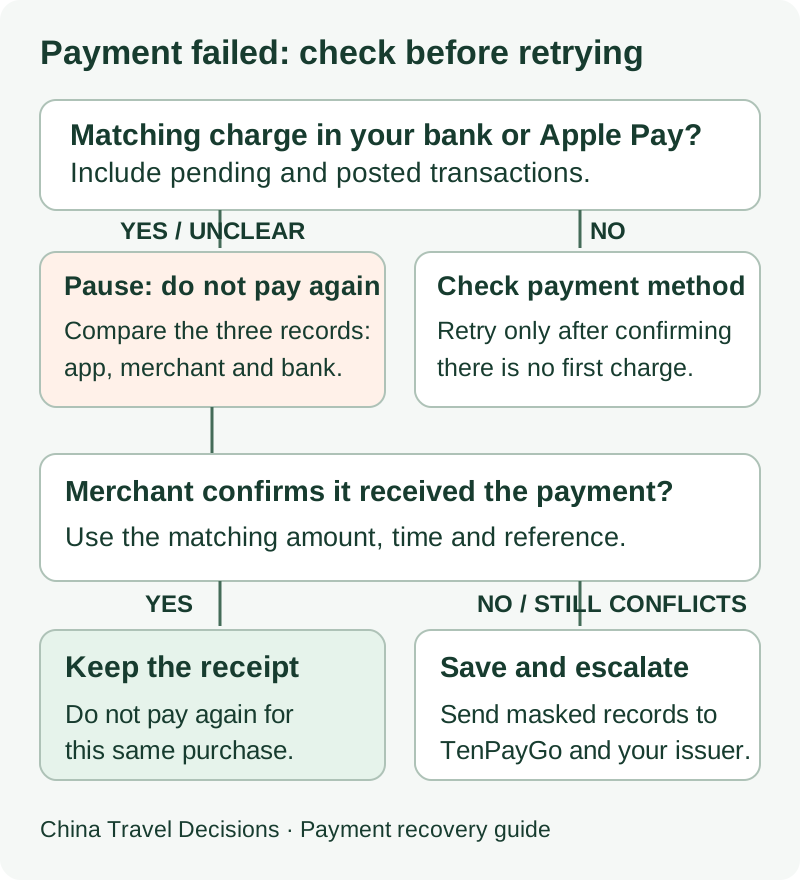
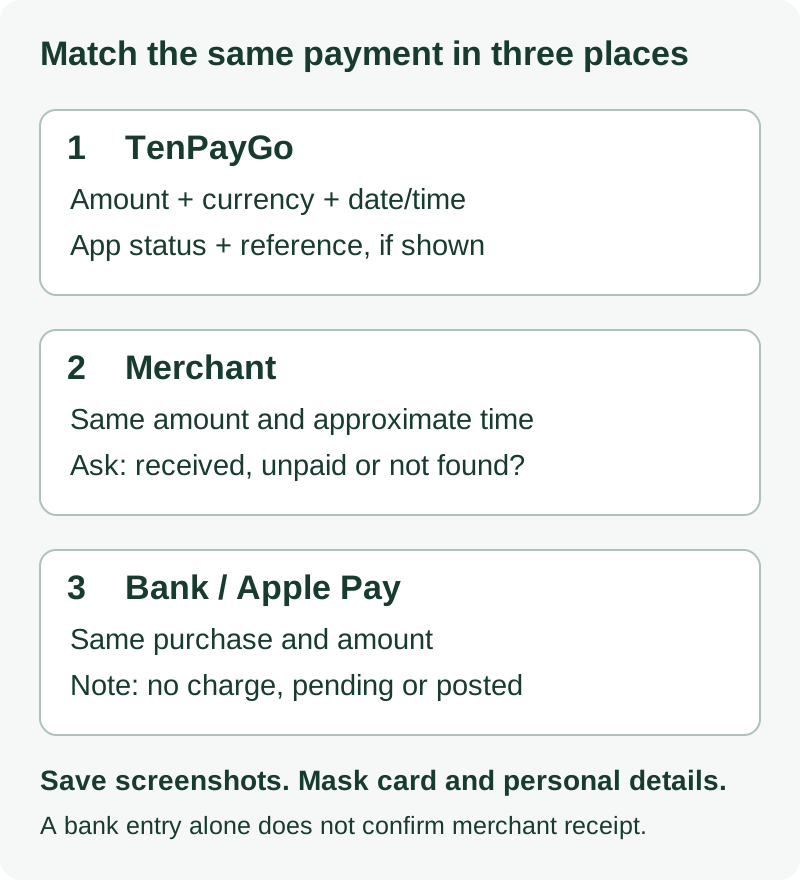
If TenPayGo says a payment failed but your card or Apple Pay shows a matching pending or posted charge, do not immediately pay the same amount again. Reconcile three records first: TenPayGo, the merchant, and your card issuer.
The official App Store listing says TenPayGo has transaction history. Use that record together with the merchant's payment status and your bank or Apple Pay status before deciding whether the first attempt really failed.
Key Takeaways
- A visible matching charge means reconciliation comes before retrying.
- Check TenPayGo transaction history, then ask the merchant whether the payment was received.
- Save the time, amount, merchant, payment status and any visible reference before records change.
- If the statuses still conflict, the official Google Play listing gives tenpaygo_support@tencent.com as the TenPayGo support email.
Match Your Situation First
| TenPayGo shows | Merchant says | Card / Apple Pay shows | What to do now |
|---|---|---|---|
| Failed | Unpaid | No matching charge | Check the payment method and issuer status. Retry only after you are satisfied the first attempt did not create a charge. |
| Failed | Unpaid | Pending or posted charge | Do not retry. Check TenPayGo history, ask the merchant to re-check, save evidence, then escalate if the records still conflict. |
| Success | Unpaid | Pending or posted charge | Show the TenPayGo transaction record and ask the merchant to check again. Do not create a second payment until the first one is reconciled. |
| Any status | Merchant confirms received | Matching charge | Keep the receipt or transaction record. Do not pay again because of a conflicting screen alone. |
Recent App Store traveler reviews include both “app failed but card charged” and “app success but merchant said unpaid” situations. Those are individual traveler reports, not proof of a universal TenPayGo bug or of what caused a particular transaction.
1. Check TenPayGo Transaction History
Open TenPayGo and find the attempted payment in its transaction history. Record what the app actually shows rather than relying only on the message you saw at the checkout screen.
Save:
- date and time;
- amount and currency;
- merchant name if shown;
- payment status;
- any transaction or reference ID that is visible.
Take a screenshot if useful, but mask full card numbers or other sensitive payment details before sharing it.
2. Ask the Merchant Whether the Payment Was Received
Show the merchant the TenPayGo transaction record and the exact amount and time. Ask them to check whether their side recorded the payment.
If they confirm receipt, keep the receipt or confirmation and do not pay again just because TenPayGo previously displayed a conflicting message.
If they still cannot find the payment, note what they told you and continue to the card check. The goal is to establish whether the first attempt reached the merchant before creating another payment.
3. Check Your Card or Apple Pay Status
Look at the matching transaction in your bank/card app and, when relevant, Apple Wallet. Note whether your issuer calls it pending, posted, declined or something else.
Do not assume that a pending item will disappear within a particular number of days. If you need to understand the issuer-side status, ask the card issuer what that specific status means.
China's official guide for foreign visitors and business expatriates notes that overseas-card payments can involve issuer verification and that payment-product rules, limits and charging standards vary. It does not establish the cause of your TenPayGo failure, but it is a reason to check both the payment app and the issuer rather than guessing.
4. Prepare Evidence for TenPayGo Support
If TenPayGo, the merchant and your issuer still disagree, send a concise record to TenPayGo. The official Google Play listing lists tenpaygo_support@tencent.com as the support email.
Include only what is needed:
- TenPayGo account email;
- date, time and timezone;
- amount and currency;
- merchant name and location;
- payment method used;
- what TenPayGo displayed;
- what the merchant said;
- what the card/bank app shows;
- any visible TenPayGo transaction/reference ID;
- masked screenshots of the relevant records.
Copyable Support Checklist
Account email: [your TenPayGo email]
Date/time and timezone: [YYYY-MM-DD HH:MM TZ]
Amount and currency: [amount]
Merchant: [name / branch or location]
Payment method: [Apple Pay / card / e-wallet]
TenPayGo status: [failed / success / other]
TenPayGo reference: [if visible]
Merchant response: [received / not found / unpaid]
Bank or Apple Pay status: [no charge / pending / posted / declined]
You can add a short request such as: “Please confirm whether this transaction appears on your side and provide any reference I can use to reconcile it with the merchant.”
5. When to Contact Your Card Issuer
Contact your issuer when you need to understand whether the transaction is pending or posted, when issuer verification failed, or when you need the issuer's instructions for a transaction you cannot reconcile.
Do not assume a refund, reversal or dispute will finish within a fixed period. Follow the issuer's process for the specific transaction.
If you still need to pay the merchant, use another payment method only after you have made a deliberate decision about the first attempt and preserved its evidence. A rushed second payment can make the problem harder by creating two transactions to reconcile.
Common Mistakes to Avoid
- Paying again immediately while a matching charge is already visible.
- Looking only at the bank app and ignoring TenPayGo transaction history.
- Looking only at TenPayGo and not asking the merchant whether it received the payment.
- Sharing full card numbers in screenshots or public posts.
- Treating one traveler's App Store report as proof of what caused your own payment problem.
For the broader setup decision, see TenPayGo for tourists in China.
Frequently Asked Questions
My card says pending. Does that mean the merchant was paid?
Not by itself. Compare the TenPayGo transaction record with the merchant's record. Ask your issuer what “pending” means for that specific transaction if the status remains unclear.
TenPayGo says success but the merchant says unpaid. Should I pay again?
Not immediately. Show the merchant the TenPayGo record and ask them to check again. Preserve the first transaction's evidence before making a second payment.
How long will a TenPayGo charge take to reverse?
There is no verified universal timeframe in the sources used for this guide. Ask TenPayGo and your card issuer about the specific transaction rather than relying on a fixed number from an old forum post.
Where can I get TenPayGo support?
The official Google Play listing gives tenpaygo_support@tencent.com. Tencent also publishes broader customer-service information, but no response or resolution time is guaranteed.
Browse other China travel essentials before your trip.