Select the exact manufacturer and product entry on the UOM form, then verify the manufacturer’s required registration serial before entering it (case-sensitive, no extra spaces). For DJI (深圳市大疆创新科技有限公司) follow DJI guidance: if the aircraft and flight‑controller serials differ, register the flight‑controller serial. Only enter private details on the official UOM site: https://uom.caac.gov.cn/ For English help, open English screenshot walkthrough.
Key takeaways
- Identify the exact aircraft model and registration serial before submitting UOM aircraft information.
- Manufacturer and product selection must match UOM’s entries exactly; do not guess or pick a similar model.
- Serial entry is case-sensitive and must match character-for-character (watch O vs 0, I vs 1, and whitespace).
- If you must share proof publicly, redact serials; provide full serials only via official UOM or manufacturer channels.
Diagnostic steps (do these in order)
-
Confirm you are on the official UOM site: https://uom.caac.gov.cn/ For English screen guidance, open English screenshot walkthrough, choose the current-step menu (labelled “Step … of 16”), then Select the exact manufacturer and model or Enter the aircraft serial and actual usage.
-
Manufacturer filter — choose the exact manufacturer entry shown in UOM’s list (don’t pick a shorthand or branch name).
-
Product model selection — select the product entry that exactly matches the aircraft product name (not the controller or bundle).
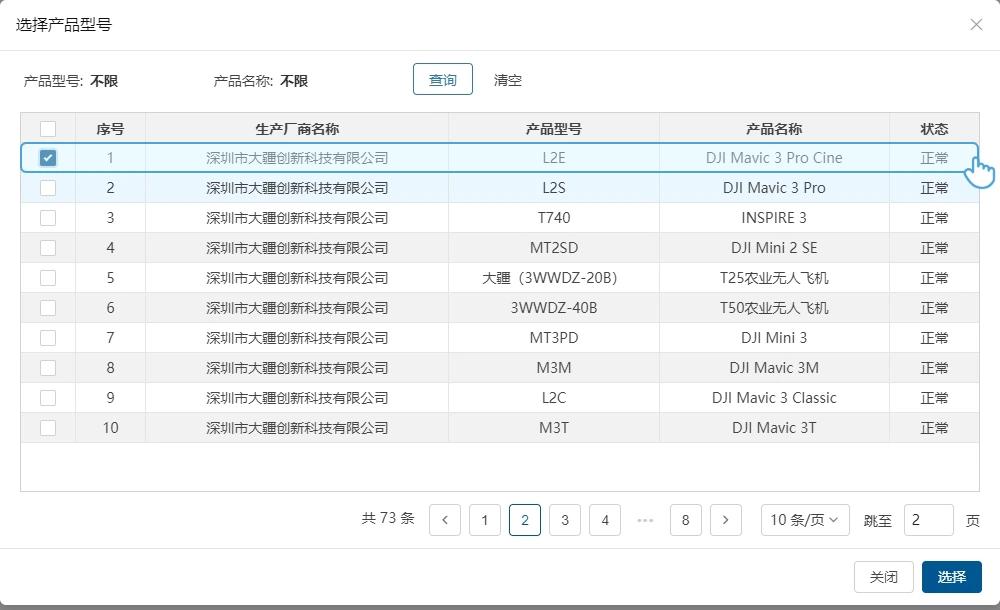 Existing UOM walkthrough example showing product/model selection — use it as a reference for choosing the exact product entry.
- Serial entry — confirm the manufacturer’s required registration serial and enter it exactly; confirm there are no leading/trailing spaces and the case matches.
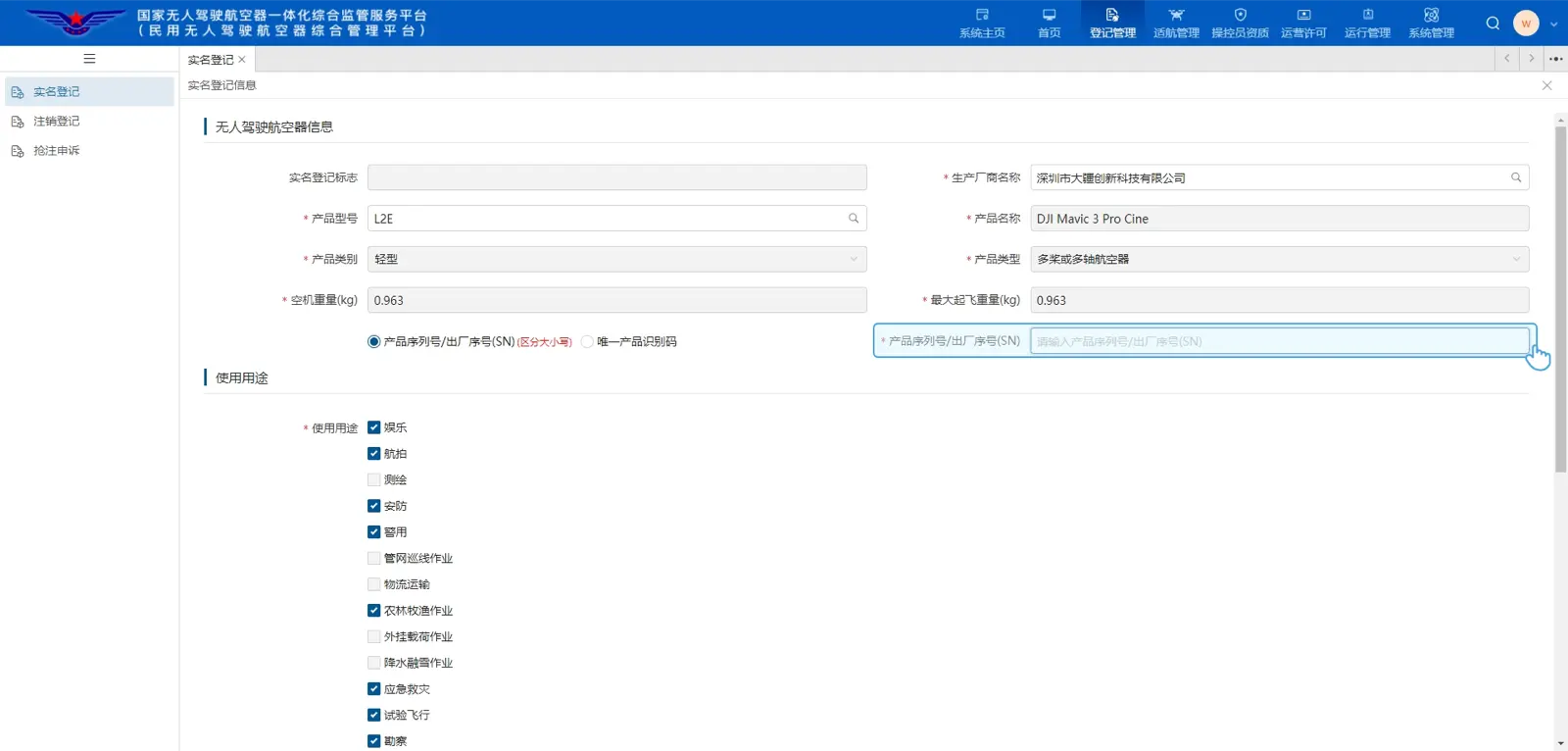 Existing UOM walkthrough example showing where to paste the serial.
- Exactness checklist — inspect character-by-character for O vs 0, I vs 1, hyphens, and any punctuation. Confirm you are using the aircraft/flight-controller SN required by the manufacturer (see DJI note below).
DJI-specific note
DJI’s guidance (深圳市大疆创新科技有限公司) distinguishes aircraft, controller and battery serials. DJI advises: if the aircraft product SN and the flight-controller SN differ, use the flight‑controller SN for registration; verify SNs in DJI Fly (My > Device Management or About). Consult DJI’s model-specific locator pages rather than assuming sticker locations. (Sources below.)
Recovery — if the model is missing or the serial still fails
-
Capture screenshots: UOM manufacturer/model selection, the serial-entry field showing rejection (if visible), and the device screen or sticker showing the serial. Redact the serial if sharing publicly.
-
Ask the manufacturer support to confirm the exact product name that appears in UOM lists (request the Chinese product string if available).
-
Use the support route shown by the current official service and explain the exact model or serial mismatch. Share sensitive serial evidence only through its private channel if requested. Do not submit with a guessed model or a different serial.
Common mistakes
- Choosing a similar-looking model instead of the exact product name.
- Copying the SN but accidentally trimming leading zeroes or adding spaces.
- Using a controller or battery SN when the aircraft or flight-controller SN is required.
What happens next
- If the exact model and serial are accepted: proceed with the UOM form’s remaining steps on the official site.
- If acceptance still fails: UOM or the manufacturer must identify the correct product entry; escalate with screenshots and the exact serial.
FAQ
Is the UOM serial field case-sensitive?
Yes — UOM requires an exact character-for-character match; treat case and each glyph as significant.
Which serial should I use for DJI aircraft?
Follow DJI guidance: if aircraft and flight-controller SNs differ, register the flight‑controller SN. DJI’s support pages show how to locate each SN.
Sources
- UOM registration root: https://uom.caac.gov.cn/
- Independent English walkthrough: English screenshot walkthrough
- DJI manufacturer model/serial policy: https://repair.dji.com/help/content?customId=01700006730&lang=zh-TW&paperDocType=ARTICLE&re=HK&spaceId=17
- DJI serial locations and app checks: https://support.dji.com/help/content?customId=zh-cn03400007347&lang=zh-CN&re=CN&spaceId=34
- Shanghai note on exact-match requirement (Suishenban described separately from UOM): https://jtw.sh.gov.cn/zsk/20260210/eff35f8bd9a5425eba32df4cf079370b.html