English guide for foreign visitors
Register Your Drone Online on CAAC UOM
Back to the China drone registration overview (CAAC UOM) · Open official CAAC UOM (new tab) ↗
You are reviewing another step.
Step 0 · Before UOM
Prepare before opening UOM
This guide walks you through the real CAAC UOM registration, screen by screen — from creating the account to Registration Complete and the registration mark. Nothing here is submitted to UOM for you: you enter your own information on the official platform.
Step 0 has no UOM screen, because you have not opened UOM yet. Work through the 7 items below first. Each one has one annotated example image and its own self-service fix if you are missing something. These are AI-generated teaching examples, not verified screenshots from UOM.
Keep private information out of this guide. Enter your password, SMS code, passport number and identity images only on the official UOM site.
What you need before you open UOM 7 items
Passport and handheld passport photo
The passport of the person who will own the UOM account. Real-name registration ties the aircraft to a named owner, so this document decides whose name goes into UOM. Prepare a clear photo of you holding the open passport data page, with your face unobstructed and passport text readable. No WeChat is needed for the foreign-passport route. Follow any additional back / visa-page slot on your live application.
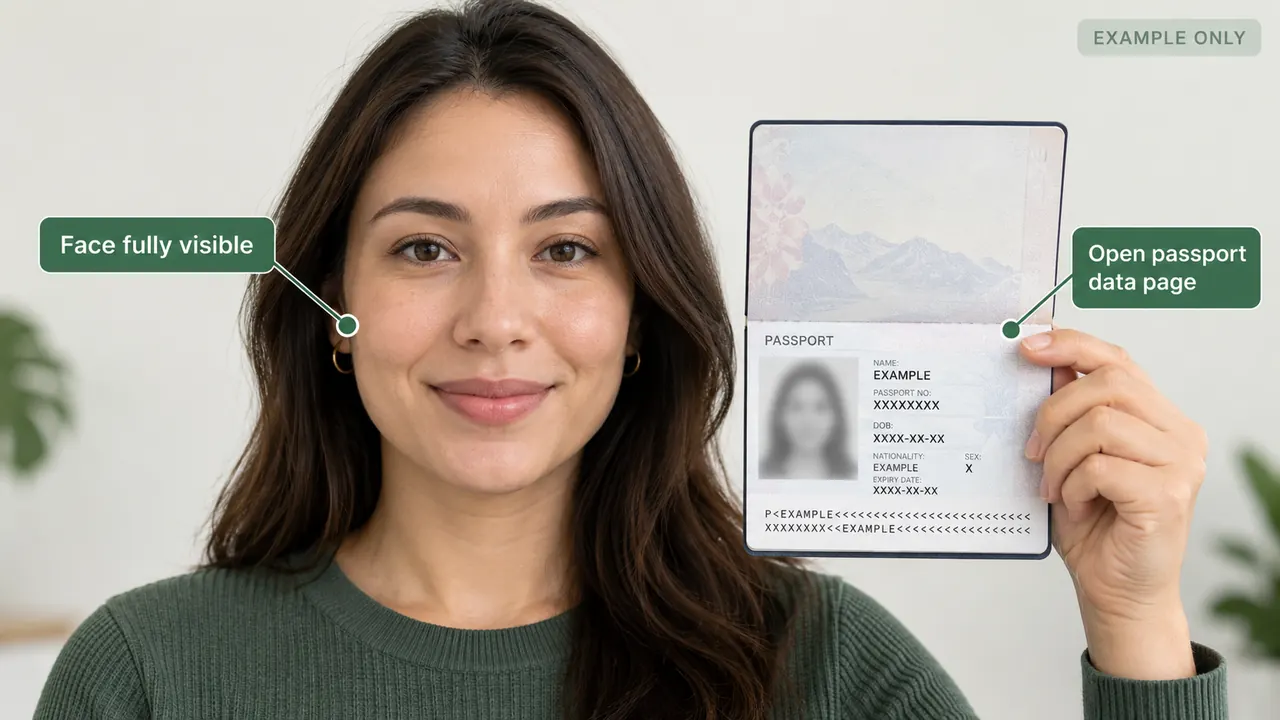
- Show the complete face and readable passport details together.
- Use the passport of the account owner. If UOM asks for an additional page, follow that live field.
Problem: You do not have the owner’s passport, or the drone belongs to someone else
Use the passport of the person who will own the UOM account. The name you type in Step 3 has to match this passport, including every given and middle name.
Flying someone else’s drone? The registered owner is the person whose identity goes into UOM. Ask that person to create the account and register the aircraft in their own name.
Travelling on a different document — permanent resident ID or a travel permit? UOM shows more than one 证件类型 (Document type), but we have only captured the passport path. Check the live field in Step 3 before you enter anything.
How you know it is fixed: You can name the exact owner and that person’s document is in your hand.
Mobile number for the SMS code手机号码 / Mobile number
Prepare a mainland +86 number that you control, receives UOM verification SMS and is eligible to verify your own identity. In our October 2026 UOM workflow, an already-verified number could not be reused for a different person.
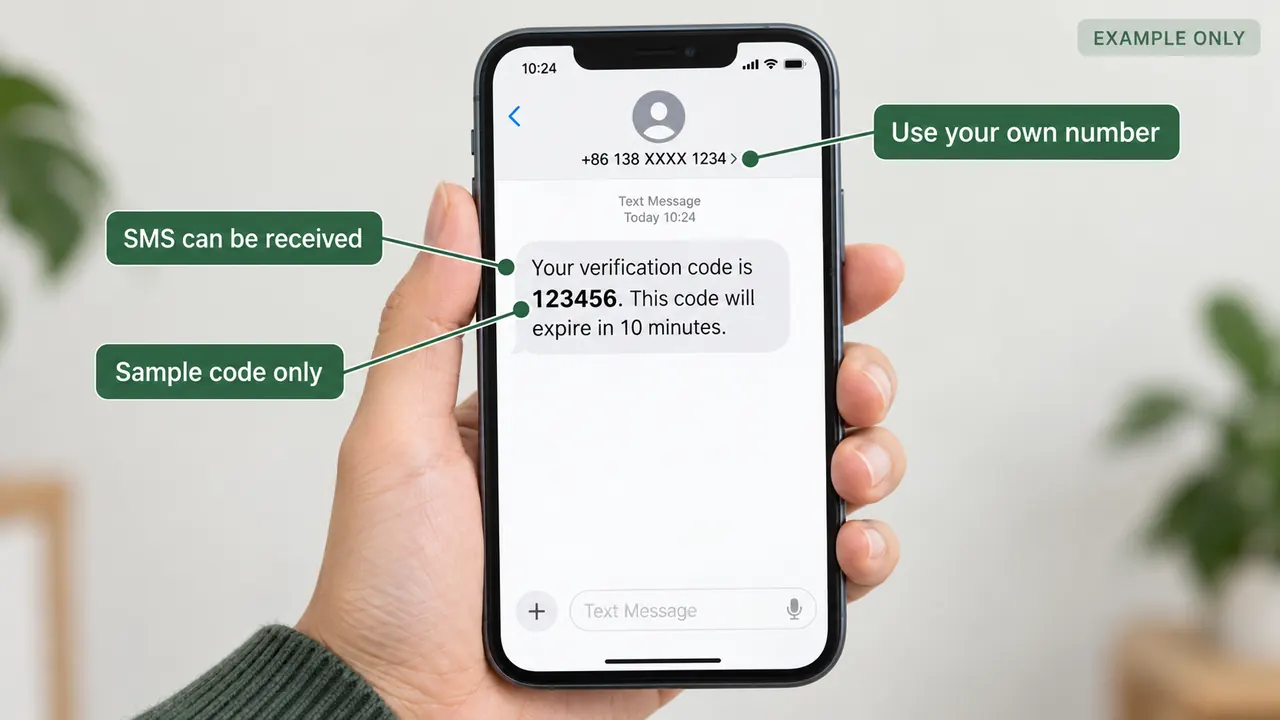
- A travel data-only eSIM is not a substitute for SMS.
- No usable Chinese number? Review the owner-name consequences before continuing.
Problem: Which number situation is yours?
In our October 2026 hands-on UOM workflow, reusing a +86 number already verified to one identity for another person failed. This is an observed platform limitation, not a published CAAC one-number-per-person rule. Check that the number is eligible for your own identity and receives SMS on the owner-contact screen (Step 4). A foreign number or data-only eSIM may not work.
Confirm the number is not already tied to somebody else’s verified UOM identity. Keep the SIM accessible for SMS and later account recovery. Proceed to the Step 4 verification screen.
How you know it is fixed: The number is available for your own UOM identity and receives the SMS requested in Step 4.
The documented passport path uses a mainland +86 number. Check whether your live form accepts your number; test SMS in Step 4. Do not assume an overseas number will work.
If no code arrives, check the exact number format accepted by the live form and whether the number can receive SMS while roaming. Request one more code, then stop requesting.
If it still does not arrive, come back to this card and take the “no usable number” path. Do not create a second account to work around it.
How you know it is fixed: A code from UOM arrives on this number and you can type it into UOM.
Plan a mainland SIM for after arrival. China Mobile, China Unicom and China Telecom self-operated branches issue prepaid lines to foreign passports — bring the same passport you will register with. Airport arrival halls usually have carrier desks.
Before you buy anything, read the local-number guidance in our China eSIM section. A travel eSIM normally solves mobile data only. If it gives you no +86 number, or cannot receive an SMS from a third party such as UOM, it does not solve this step. Optional: local number / SMS guidance ↗
For US$80 full assistance without your own mainland number, ask about registration under an eligible individual or organization that is genuinely the drone’s legal owner. This uses the other owner’s UOM account, not your personal identity. If you want registration in your own name, first obtain an eligible +86 number. Compare both US$80 registration routes ↗
How you know it is fixed: For personal DIY registration, obtain a +86 number that UOM accepts for your own identity before continuing to Step 4. Otherwise switch to the assisted registered-owner route; do not use another person’s identity in your own UOM form.
Email address电子邮箱 / Email
Any normally working email address. 电子邮箱 (Email) is a contact field in the CAAC registration procedure, and the registration mark can be sent to it later.
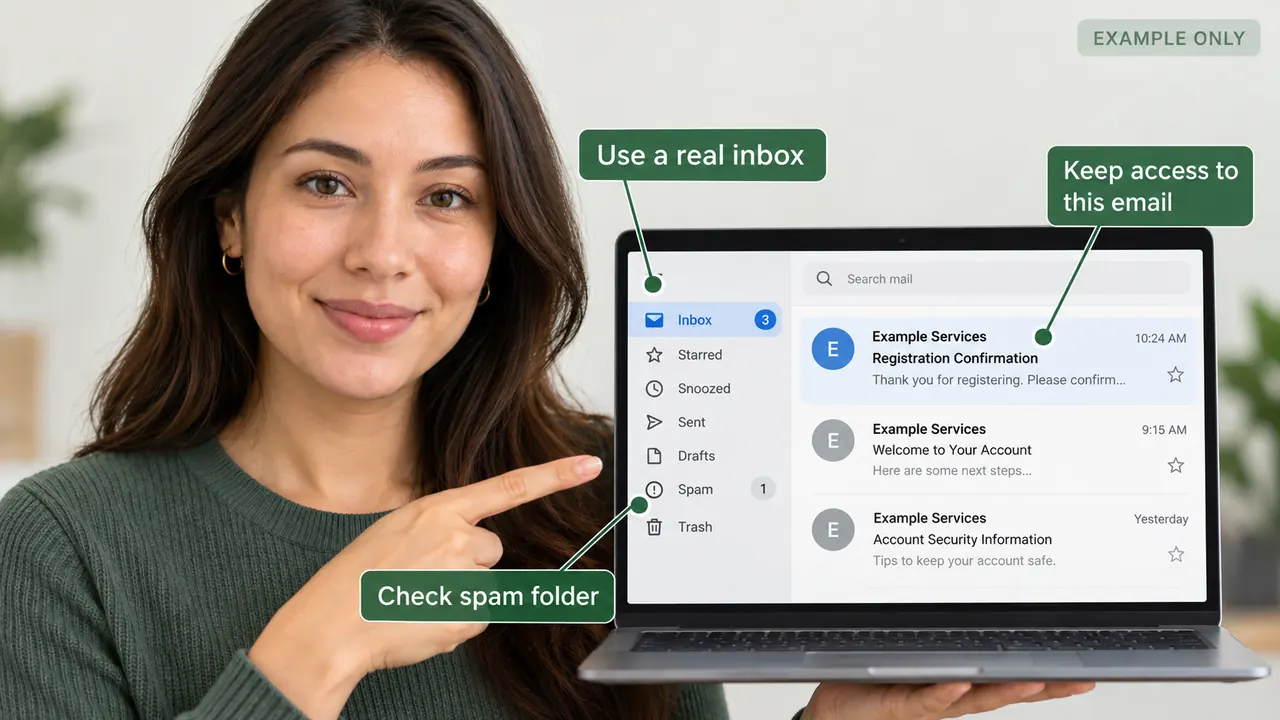
- Check inbox and spam; save access to the same account.
- The sample message is illustrative, not a promised UOM email.
Problem: You do not have an email address you can open on this trip
Create a free mailbox and sign in on your phone before you start UOM.
Check the inbox can receive automated mail. A work address with a strict spam filter can silently drop a government platform message.
Keep the same address for the whole flow. Changing it later means the registration mark goes to the old inbox.
How you know it is fixed: You can open that inbox on your phone right now.
Contact / correspondence address in China境内居住地址 / Mainland residence address
A China correspondence address you can supply in UOM. The address fields are part of the CAAC registration procedure, so this is a required field — how strictly the live platform checks it is what we have not confirmed.
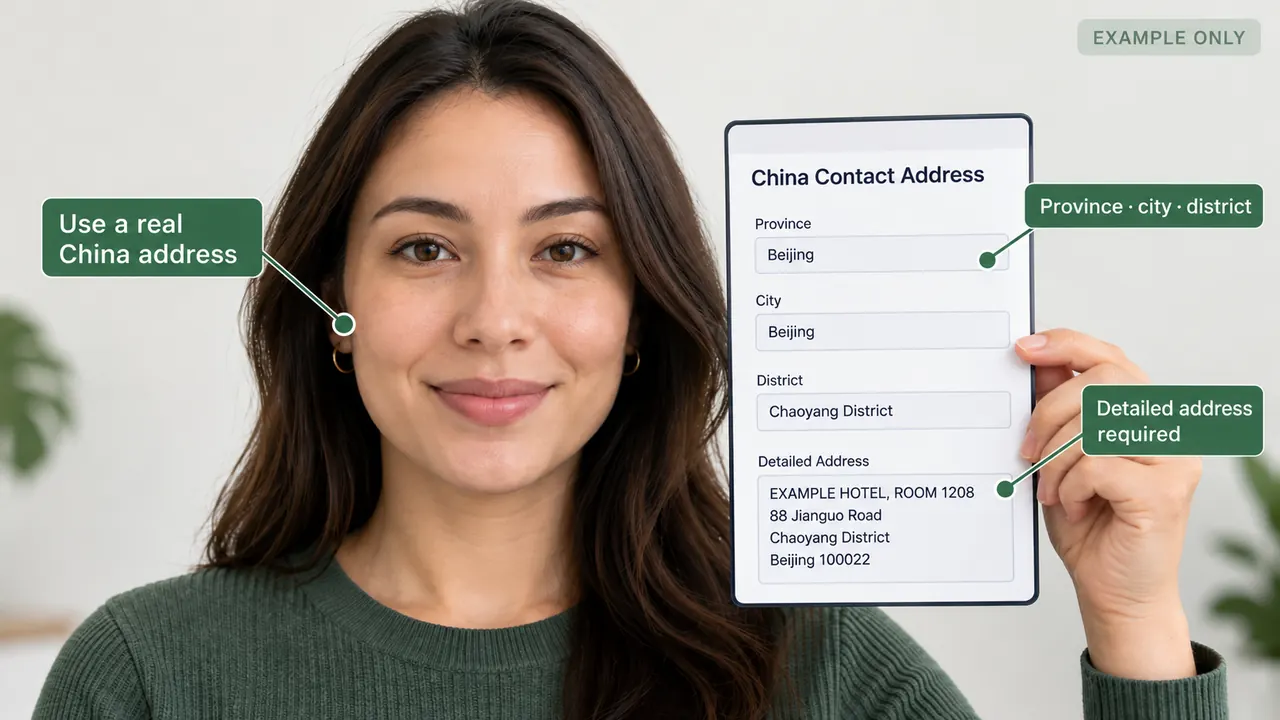
- Confirm province, city, district and exact building details.
- Use a real address; do not invent a location to pass validation.
Problem: You do not have a China address yet
Confirm your first accommodation before Step 4 and use that address. Travelers report that accommodation addresses are used for this field. We have not confirmed that against the live UOM screen.
Staying with friends or family? Ask the host for the full address in Chinese — province, city, district and street detail.
Step 4 shows the exact 境内居住地区 and 境内居住地址 fields and we compare your entry with your live screen there. Never enter an address that is not real to get past a field.
How you know it is fixed: You can write one accurate China address in Chinese characters.
Drone brand and exact model产品型号 / Product model
The exact brand and product model of the aircraft that will be registered. UOM has a long model list, and picking a near-match puts the wrong record on your aircraft.
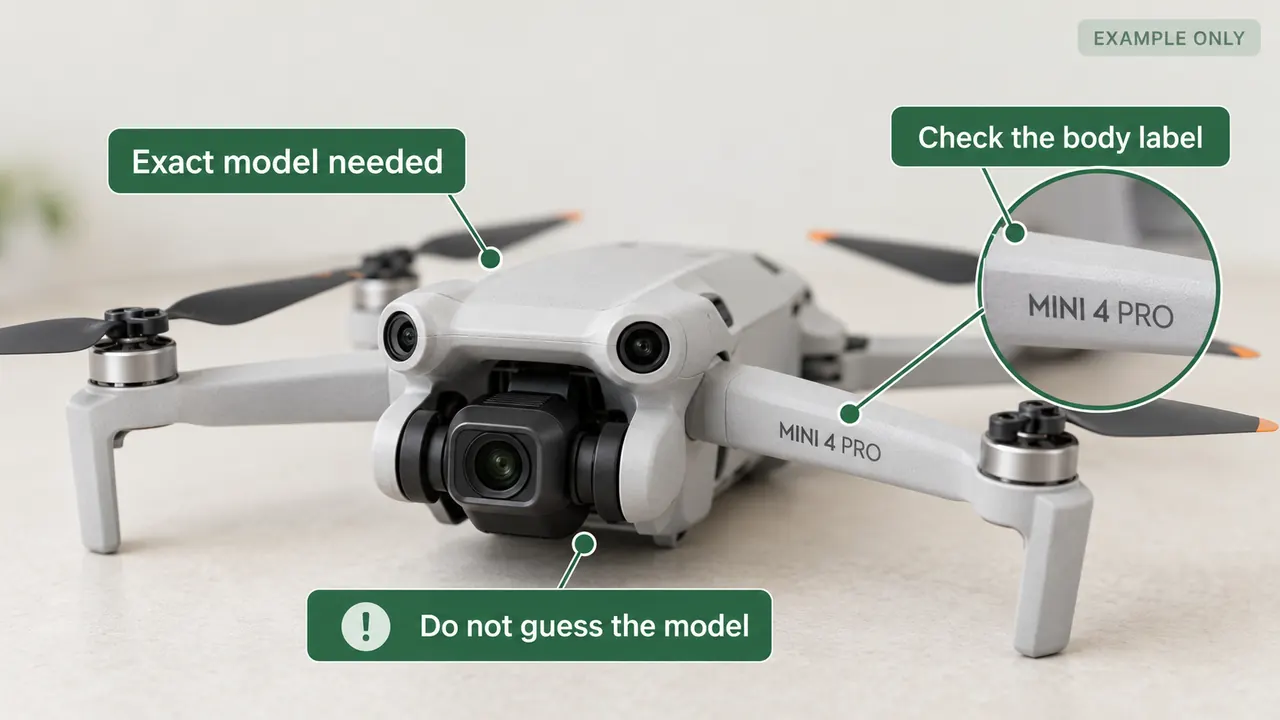
- Check the airframe label or manufacturer app.
- Select an exact match later; Mini 4 and Mini 4 Pro are different.
Problem: You are not sure which model you have
Read the label on the aircraft or the box. Look for the product name plus any suffix — not the marketing nickname.
Open the manufacturer app and read the model from the aircraft’s own information screen.
Still unsure? Choose “My exact model is not listed” in the picker below and type both brand and model. A near-match is worse than an exact custom entry here.
How you know it is fixed: You can write the brand and the exact product name, with its suffix.
Aircraft serial number source产品序列号/出厂序号(SN) / Serial (SN)
You need to know where to read the aircraft serial now, because you will type it into UOM in Step 11 — Enter the aircraft serial and actual usage.
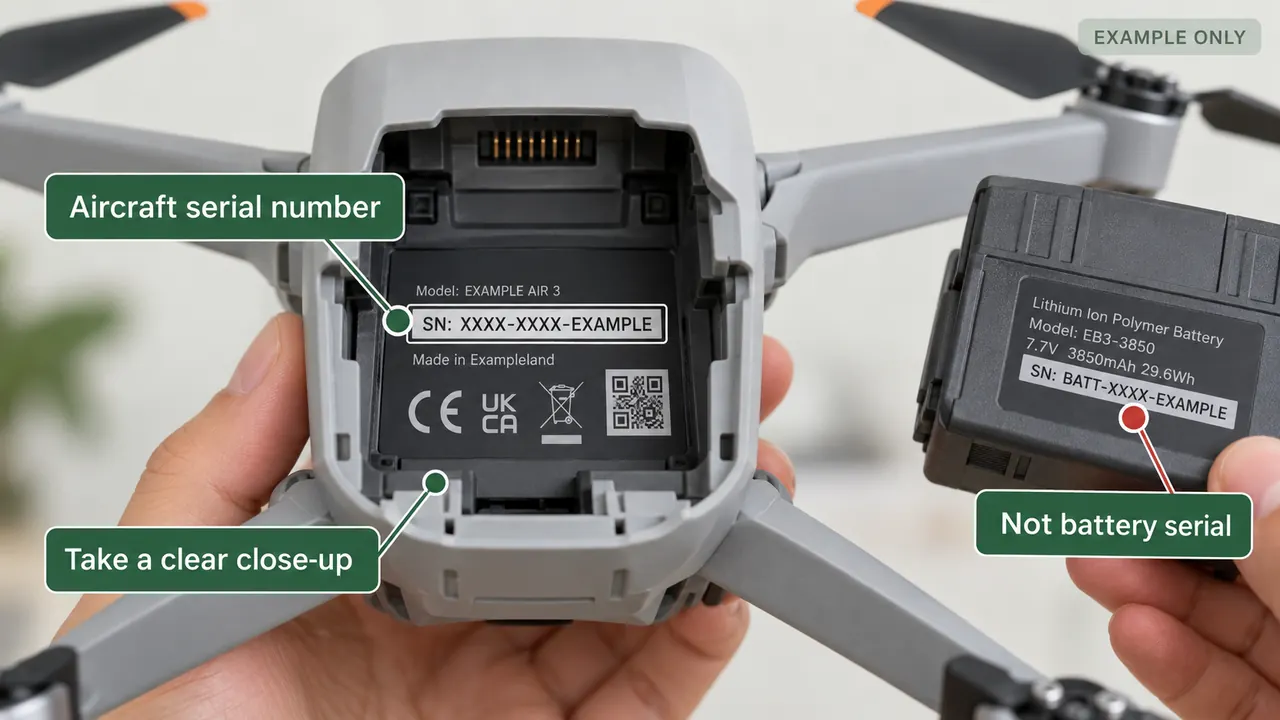
- Compare the physical label with the app reading.
- If serial types conflict, stop and verify; do not guess.
Problem: You cannot find the serial, or you are not sure which number it is
DJI: connect the aircraft and controller, then open DJI Fly → flight view → ··· → 关于 (About) → 飞机序列号 (Aircraft serial).
Also check the label on the airframe, usually under the battery, or on the gimbal housing.
Never use the battery, controller, charger or gimbal serial. If the product serial and the flight-controller serial differ, the manufacturer guidance says UOM wants the flight-controller serial. That conflict is a real blocker — keep it and use Need help?.
How you know it is fixed: The serial is written down exactly as shown, including its letter case.
Two aircraft photos无人机照片 / Aircraft photos
Two photos for the aircraft registration screens in Step 12 — Upload the aircraft and serial photos.
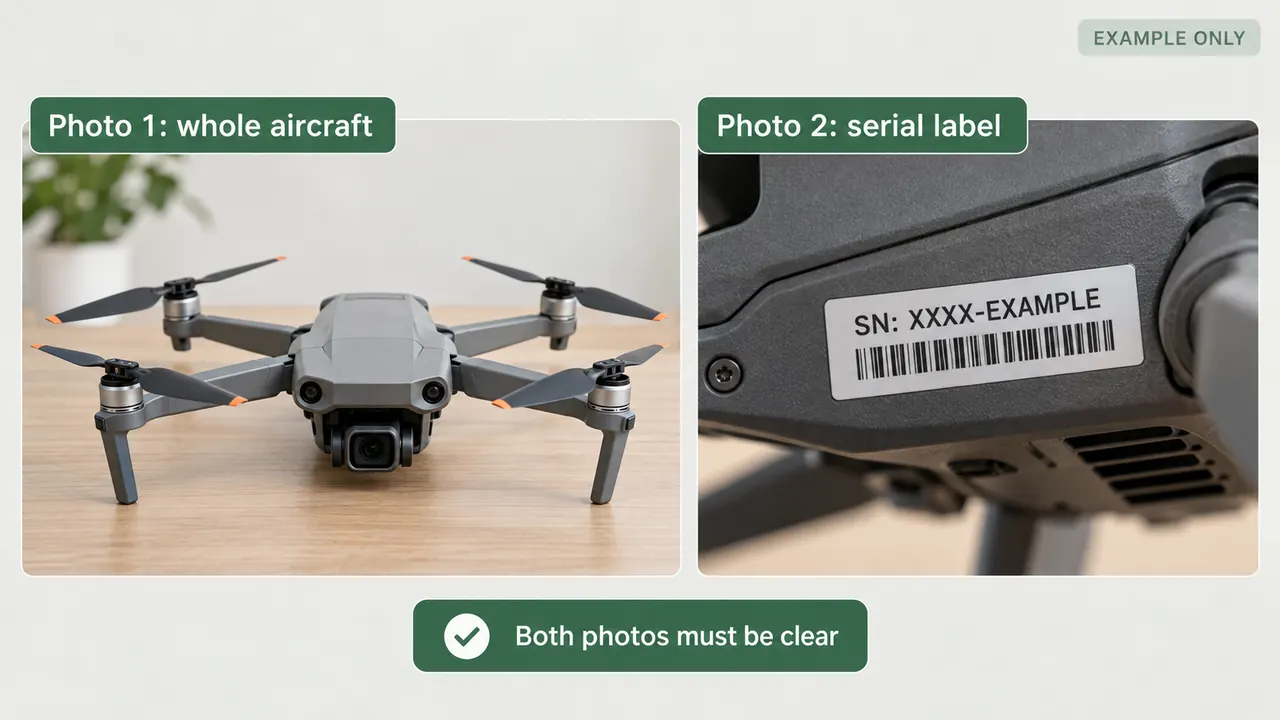
- Image 1: entire drone visible. Image 2: readable serial-label close-up.
- Check current UOM format and file-size limits when uploading.
Problem: You cannot produce two usable photos yet
Photo 1 — the whole aircraft, front view, in focus, with nothing covering the body.
Photo 2 — a sharp close-up of the serial label, with enough of the aircraft around it to show where the label sits.
Shoot in daylight and avoid glare on the label. Open both files once before you need them. Step 12’s official crop shows JPG/JPEG/PNG and size ≤10M — if UOM rejects a file, still read that exact live error.
How you know it is fixed: Both photos are on the device you will use for UOM, and both are readable.
Ready to continue?
Blocked on something that is not listed above? Use Need help? at the bottom of the screen. There is no other hand-off inside this step.
Step 1 · Create your UOM account
Open UOM and find registration
Live-checked 2 October 2026 against official UOM (uom.caac.gov.cn). Entry (1.1) and registration notice (1.2) are live reference screenshots. After 下一步, UOM opens account credentials — that screen is Step 2.
1.1 · What you should see — official entry
- 1 · 手机号登录 — Mobile-number login
- 2 · 账号登录 — Account login
- 3 · 发送验证码 — Send verification code
- 4 · 立即登录 — Log in now
- 5 · 免费注册 — Free registration
- 6 · 账号问题申诉 — Account-issue appeal (not needed for registration)
- 7 · 忘记密码? — Forgot password? (not needed for registration)
Login-only placeholders (not used for Free registration): 请输入手机号 · 请输入图形验证码 · 请输入短信验证码.
Not needed for registration: 账号问题申诉 / Account-issue appeal and 忘记密码? / Forgot password? are recovery links for existing accounts. For a new registration, use 免费注册 only.
Do this now
- Use Open official UOM ↗ in this page’s header. It opens UOM in another tab.
- Keep this guide open in your original tab.
- Find ① 免费注册 / Free registration. The SMS fields above it belong to 手机号登录 / Mobile-number login; they are not registration.
1.2 · What you should see — registration notice
- 1 · 用户注册须知 — User registration notice
- 2 · 我已阅读并接受上述内容 — I have read and accept the above
- 3 · 下一步 — Next
What this notice says (summary)
Plain-language summary, not a legal translation. The binding text is the Chinese original on UOM.
- You must provide true, accurate personal or unit information as required by CAAC-related rules.
- After registration, you are responsible for your account, password, and all activity under that account.
- Privacy policy essentials: the platform states it will not disclose registration data or non-public stored content to third parties except with your authorization, by law, by competent authorities, or to protect the public interest.
- The platform may terminate service if the information you provide is false or incorrect.
Also on-screen (annotated above): title 用户注册须知, checkbox 我已阅读并接受上述内容, button 下一步. Registration steps listed in the notice describe filling account credentials then completing personal/unit information — those screens are Steps 2–3 here.
Do this now
- Click 免费注册 / Free registration on the entry screen.
- Read ① 用户注册须知 / User registration notice.
- If you accept, tick ② 我已阅读并接受上述内容.
- Click ③ 下一步 / Next.
Check before continuing
- You clicked 下一步 on the registration notice.
- You can see the account-credentials fields (用户类型 / 登录账号 / passwords).
- The address bar is on official uom.caac.gov.cn or DJI-linked uas.caac.gov.cn.
- UOM stays open in its own tab; this guide stays in the other.
If this fails
Overseas access can be slow or fail. Try a normal browser, retry later, or obtain the official app through UOM’s own download link when the site is reachable. App-store availability and performance vary; a VPN or an assisted service does not guarantee access.
My screen looks different
Problem: Your controls do not match the reference.
- Try 1 — different path: These are website screenshots; app controls may differ.
- Try 2 — different sub-page: Return to the official entry using the header link. Select Free registration rather than mobile login.
- Try 3 — changed UI: Match only the labels shown in the reference screenshot. Live UOM puts account credentials after the notice — continue with Step 2. Do not guess a Chinese button.
How you know it is fixed: You can identify the registration notice and the credentials screen that follows. If all three checks fail, use the floating Need help? button.
UOM will not open / app is unavailable
Problem: The official site or app cannot be opened. Overseas users have reported slow pages, timeouts or failed access; this does not establish a blanket ban on foreign networks.
- Try 1: Retry the header’s official web link. DJI also links the official web login; keep it in another tab.
- Try 2: Use the official iOS or Android download link on the official UOM site if installable. App Store regional availability problems are traveler reports, not a guaranteed restriction.
- Try 3: Try another connection, then retry the website if the app is unavailable. Never enter credentials on an agent’s substitute login page.
How you know it is fixed: The official platform loads and you can find registration. If none works, use the floating Need help? button.
Step 1 ends when you see the credentials screen after the notice. Confirm below — Step 2 then walks through filling those fields. Previewing Step 2 from the outline before that confirm does not complete this step.
Step 2 · Account credentials
Choose an individual account and credentials
Live reference screenshot from official UOM (uom.caac.gov.cn/#/register) on 2 October 2026 — the screen immediately after the registration notice. We have not reconfirmed the latest live interface because the official site timed out during this research. Enter login details only on official UOM. This guide never asks for or stores passwords.
What you should see — account credentials
- 1 · 个人 — Individual — select this for your own registration
- 2 · 登录账号 — Login account / username
- 3 · 登录密码 — Login password · 8–20 characters and all four types
- 4 · 确认密码 — Confirm password · match exactly
- 5 · 下一步 — Next · continue only when the fields are correct
Do this now
- At ① 用户类型, choose 个人 / Individual for registration in your own name. Do not assume the radio is already selected; confirm the actual selection on the live screen. 单位 / Organization is a different account type.
- Enter a login account name in ② 登录账号. No character rule is visible on the live field — use letters and digits you can remember, and mark any live validation UOM shows as unverified until read on your screen.
- Enter a password in ③ 登录密码 that follows the exact live rule above (all four character classes, 8–20 characters).
- Repeat the same password in ④ 确认密码.
- Click ⑤ 下一步 / Next (not 上一步).
What to enter — only on official UOM
Never type your login account or password into this guide. Enter them only on the official UOM tab.
| UOM field | Fill with | Notes / format check |
|---|---|---|
| 用户类型 / User type | 个人 / Individual | Do not choose 单位 for a personal foreign-owner registration. |
| 登录账号 / Login account | A username you invent | Not your passport number and not your phone. No acceptance rule is visible on the live field; if UOM rejects a format, read the live error (resolver E2). |
| 登录密码 / Login password | Your own password that meets the live rule | 注:密码至少是8到20位数字、大写字母、小写字母、特殊符号的四种组成 — Note: The password must be 8 to 20 characters and composed of all four types: digits, uppercase letters, lowercase letters, and special symbols. Use a strong unique password within 8–20 characters that includes all four required classes. A password manager can generate one. Never store or share a real password here. |
| 确认密码 / Confirm password | Identical re-entry | Must match 登录密码 exactly. |
Check before continuing
- 个人 is selected, not 单位.
- Password self-check against the live rule: 8–20 characters · includes a digit · includes an uppercase letter · includes a lowercase letter · includes a special symbol.
- Both password fields match.
- You are on official uom.caac.gov.cn (or the DJI-linked uas.caac.gov.cn entry).
If this fails
Your Step 0 note: you have a foreign number — when the later SMS panel appears after credentials, test it there; if the code never arrives, open the SMS resolver below.
Password doesn't meet requirements
Problem: UOM rejects the password against its displayed rule.
- Try 1 — length: Count characters; the live rule requires 8 to 20 (8到20位).
- Try 2 — four classes: Confirm the password includes all of: digits (数字), uppercase (大写字母), lowercase (小写字母), and a special symbol (特殊符号).
- Try 3 — retype both fields: Clear 登录密码 and 确认密码, enter a new compliant password once, then identically again. Do not paste from this page.
How you know it is fixed: UOM accepts the password and lets you leave the credentials panel with 下一步.
Login account already taken / invalid format
Problem: UOM rejects the login account.
- Try 1 — read the live error: Copy the exact Chinese or English message UOM shows. The accepted format for 登录账号 was not visible on the credentials panel in the reference screenshot; treat any format claim beyond that as unverified.
- Try 2 — safe adjustment: Change to a different invented username (letters and digits you can remember). Avoid passport numbers and phone numbers.
- Try 3 — uniqueness: If the live error says the account already exists, invent another username rather than reusing an old one you cannot control.
How you know it is fixed: UOM accepts the login account field without an error beside it.
My screen looks different
Problem: Your controls do not match this live credentials reference.
- Try 1 — different path: These are website screenshots; app controls may differ.
- Try 2 — wrong sub-page: Return via the header’s official link, complete Free registration and the notice, then confirm you are on 注册账号信息 (wizard step 2), not mobile login.
- Try 3 — changed UI: Match only the labels shown in the reference screenshot. Do not guess a Chinese button. If the labels are gone or renamed, use Need help?.
How you know it is fixed: You can identify 用户类型, 登录账号, 登录密码, 确认密码, and 下一步 on your own session.
I clicked 下一步 and now I see SMS / mobile / email fields
Problem: After credentials, UOM shows a later wizard panel with contact / SMS controls. That is expected — it is not the entry-page mobile login.
Later panel in the registration wizard; labels here come from a reference screenshot, not a live UOM session — match your own screen. The exact panel was not live-rechecked on official UOM because it requires submitted credentials.
- 1 · 手机号码 — Mobile number
- 2 · 图形验证码 — Image challenge
- 3 · 短信验证码 — SMS verification code
- 4 · 获取验证码 — Get verification code
When these fields appear
- Enter your prepared number in 手机号码.
- Complete 图形验证码 using your own live image.
- Click 获取验证码 and wait for your SMS.
- Enter that SMS code in 短信验证码, only on official UOM. Fill 电子邮箱 with an email you can open.
| UOM field | Fill with | Notes / format check |
|---|---|---|
| 手机号码 / Mobile number | The number you prepared in Step 0 | No country-prefix selector is visible in this reference. An accepted foreign-number format is unverified. |
| 短信验证码 / SMS code | The code you actually receive | A fixed six-digit rule is unverified in this screenshot. Never enter the code here. |
| 电子邮箱 / Email | An email you can access | Contact field for this later panel; spelling matters. |
If the SMS code never arrived:
- Try 1: Recheck the number on your live screen and solve its image challenge. Foreign-number format is unverified.
- Try 2: Wait for any countdown, then resend once with 获取验证码. On the entry login screen the different button is 发送验证码.
- Try 3: Use the official app download links on the official UOM site; do not start duplicate accounts.
Traveler reports flag foreign-number failures; current foreign SMS acceptance is unconfirmed. A data-only eSIM does not provide a phone number for SMS.
How you know it is fixed: The UOM code arrives at your own number and UOM accepts it — or you can continue the later wizard panel without an SMS error.
Confirm when you have filled credentials on official UOM and clicked 下一步. SMS / email fields that appear afterward are the next wizard panel — use the resolver above for guidance; they do not reopen Step 1.
Step 3 · Owner identity
Enter the foreign owner’s identity
Identity form guide — reconstructed from foreign-owner references
Not shown in the reference: Wizard progress after step 2 shows 完善… only — full step-3 title is cut off in the reference screenshot. Read the full title in your live UOM session.
Original reference placeholders (also explained in the field table): 请输入您的真实姓名 · 请输入您的证件号码 · 请输入证件有效起始日期,例20010203 · 请输入证件有效结束日期,例20210203 · 请选择您的出生日期.
\nEarlier reference contained these controls: 请选择您的出生日期 · 请选择您的民族 · cascade 省/市 · address hint 详细地址不必重复填写地区. Contact fields continue into Step 4.
Not shown in the reference: The live graphic-challenge image and any 获取验证码 control are not clearly visible in the lower reference screenshot — follow your own UOM session.
Earlier third-party screenshots are partially cut off and have been replaced here by labeled, privacy-safe field reconstructions. They are not evidence of the current interface.
What happens after you submit: Submitting this identity form is not account approval. Approval arrives later by SMS from the CAAC Information Center; a real approval SMS sample is shown in the account-review steps (7–8), not here. Do not treat form submission as Step 3 “approved.”
Do this now
- Confirm you are on wizard step 完善账号信息 (complete / improve account information) after account credentials — not the login page and not the credentials panel.
- In ① 姓名, enter the owner’s name exactly as on the passport data page (see table). Never type it into this guide.
- Open ② 证件类型. The earlier reference shows 身份证 in the closed dropdown. For a foreign passport, select the passport option — Traveler walkthroughs say select “Passport”; the Chinese option visible in prior live UOM DOM notes is 护照. The full dropdown list is not open in the reference screenshot; if you cannot find it, use resolver E2.
- Enter ③ 证件号码 from the passport data page (Passport No.), not MRZ check digits.
- Fill ④⑤ validity dates using the on-screen date format: YYYYMMDD examples 20010203 / 20210203.
- Select ⑥ 出生日期, ⑦ 性别 (男/女), and ⑧ 民族 as your live screen requires. Country/region for a foreign passport is covered in the table (unverified in these reference screenshots).
- Click 下一步 on official UOM when the identity block is filled. Address / SMS / email fields that continue on the same long form belong to Step 4 — do not mark Step 3 complete for those alone.
What to enter — only on official UOM
Never type a real name, passport number, or date of birth into this guide. Enter them only on official UOM.
Passport source map: use the data page (visual fields). The MRZ at the bottom uses < fillers and check digits — do not copy those into UOM fields.
| UOM field (verbatim from screenshot) | Fill with | Format check |
|---|---|---|
| 姓名 / Name | Owner’s name as printed on the passport data page (Surname / Given names). The earlier cropped reference shows a single 姓名 field; the current UOM interface may differ. | Character-for-character with the passport, including spaces and case. Traveler reports (real rejection SMS): if the passport distinguishes Surname, Given names, Middle name, separate with commas (,). |
| 证件类型 / Document type | Not the default 身份证. Foreign passport holders: select the passport option (护照 per prior live DOM / traveler “Passport”). | Dropdown options beyond the default are not fully visible in the reference screenshot (menu closed). Exact Chinese for every option is unverified here; if 护照 is missing, use E2. |
| 证件号码 / Document number | Passport number from the data page (“Passport No.” / equivalent). | No spaces. Do not append MRZ check digits or < fillers. |
| 证件有效起始日期 / Document validity start | Passport date of issue from the data page. | On-screen example 20010203 → visible format YYYYMMDD. (The reference screenshots omit 期, while some operational references include it — this step follows the reference screenshots.) |
| 证件有效结束日期 / Document validity end | Passport date of expiry from the data page. | Example 20210203 (YYYYMMDD). End must be after start. DJI also mentions long-term code 00000000 — treat as unverified for an ordinary foreign passport. |
| 出生日期 / Date of birth | DOB from the passport data page. | On-screen hint says 请选择您的出生日期 (select) — use the live picker; use the format requested by UOM. |
| 性别 / Gender | Match passport sex: 男 (Male) or 女 (Female). | Only these two options are visible in the reference screenshots. |
| 民族 / Ethnicity | Select as required on your live screen. Traveler walkthroughs say foreigners select an appropriate option — the exact foreign option text is unverified in these reference screenshots. | On-screen hint: 请选择您的民族. Use the ethnicity option shown in your live UOM session. |
| Document country / region (Chinese label unverified in these reference screenshots) | Issuing country of the passport. Traveler walkthroughs name “Document Country/Region”; prior live DOM notes used 证件国家(地区) — not re-verified in the screenshots shown here. | Use the EN→中文 reference lookup below when picking a Chinese country name. This lookup is reference data, not UOM UI. |
Nationality / country reference (not UOM UI)
Standard Chinese country names for common visitor nationalities. Use only to find the right option in a live country picker — these strings are not transcribed from a UOM dropdown screenshot.
| EN / code | 中文 (reference) |
|---|---|
| US | 美国 |
| UK | 英国 |
| CA | 加拿大 |
| AU | 澳大利亚 |
| DE | 德国 |
| FR | 法国 |
| JP | 日本 |
| KR | 韩国 |
| SG | 新加坡 |
| IT | 意大利 |
| ES | 西班牙 |
| NL | 荷兰 |
| NZ | 新西兰 |
| CH | 瑞士 |
Check before continuing
- 姓名 matches the passport data page exactly (characters, case, spacing).
- 证件类型 is the foreign passport option — not 身份证.
- 证件号码 has no spaces and no MRZ check digits.
- Validity start/end match the passport and are in the right order (YYYYMMDD as shown).
- Country/region (if shown) was picked from a real option / the reference lookup — not typed phonetically.
If this fails
E1. Name format resolver
Name format resolver
The rejection rules below come from a real CAAC Information Center rejection SMS (traveler evidence). They are not a live UOM field tooltip. Live UOM for this foreign identity screen was not rechecked in this workspace.
Pick what happened — then follow that branch. Never type your real name into this guide.
Problem: UOM rejected the 姓名 field for order — family name vs given names do not match how the passport presents them.
- Try 1: Open your passport data page (not the MRZ alone). Note Surname / Given names order exactly as printed.
- Try 2: Traveler reports (and the real rejection SMS below) say the name must follow passport order and content character-for-character. Re-enter 姓名 on official UOM to match that order — do not invent a “Westernized” reorder.
- Try 3: If the passport lists Surname, Given names, and Middle name as separate lines, traveler reports (from the same rejection SMS) say to separate them with commas (,). Only do this when your passport actually distinguishes those parts.
How you know it is fixed: UOM accepts the resubmitted 姓名, or a later review SMS no longer cites name order.
Problem: The rejection points at spacing in 姓名.
- Try 1: Compare every space on the passport data page with what you typed in UOM. Count spaces between given names.
- Try 2: Traveler reports: spaces must match the passport exactly. Do not remove spaces to “simplify” the name.
- Try 3: Do not copy spacing from the MRZ (it uses < fillers). Use the visual data-page spelling only.
How you know it is fixed: Resubmitted 姓名 matches passport spacing and UOM no longer rejects for spaces.
Problem: Letter case in 姓名 does not match the passport.
- Try 1: Check whether the passport data page shows uppercase, mixed case, or another style.
- Try 2: Traveler reports (rejection SMS): letter case must match the passport exactly. Re-type on UOM; do not assume all-caps is always required.
- Try 3: If your passport has no Latin spelling, the rejection SMS says to use the language written on the passport — still matching case as printed.
How you know it is fixed: Case matches the passport data page and the name rejection no longer cites capitalization.
Problem: Punctuation in 姓名 was rejected — often missing or misplaced commas between name parts.
- Try 1: Read the live rejection text. A real rejection SMS requires commas (,) to separate Surname, Given names, or Middle name when the passport distinguishes them.
- Try 2: Traveler reports: add commas only where the passport actually separates those parts. Do not add a comma from a generic blog template if your passport is a single given-name line.
- Try 3: Remove extra symbols that are not on the passport data page (periods, extra hyphens) unless the passport itself shows them.
How you know it is fixed: Punctuation matches the passport distinction of name parts and UOM accepts the field.
Problem: A middle name was omitted, merged, or placed incorrectly.
- Try 1: List every given / middle name line on the passport data page.
- Try 2: Traveler reports: do not silently drop a middle name to bypass an error. Include every part the passport shows.
- Try 3: If parts are distinguished, the rejection SMS pattern uses commas (,) between Surname, Given names, and Middle name — traveler report, not a live field tooltip.
How you know it is fixed: All passport name parts appear in 姓名 in passport order and the middle-name rejection clears.
Problem: The rejection text does not clearly map to order, spaces, case, punctuation, or middle name — or names another field.
- Try 1: Save the full rejection SMS or on-screen reason privately. Match only the field it names.
- Try 2: Compare 姓名 again character-for-character with the passport data page using the real rejection screenshot evidence below as the pattern.
- Try 3: If the reason is still unclear after three careful passport checks, use Need help? with the blocker carried — do not upload passport images here.
How you know it is fixed: Either the named field is corrected and accepted, or a specialist has the exact rejection wording.
E2. Document type not found / no foreign option
Problem: You cannot find a foreign-passport option in 证件类型.
- Try 1 — reopen and scroll: Open the dropdown fully and scroll. The reference screenshot shows the field closed on default 身份证; the open list is not shown.
- Try 2 — confirm screen: You must be on 完善账号信息 after a 个人 account credentials step. Distinguishing marks: fields 姓名 / 证件类型 / 证件号码 (not 登录账号 / 登录密码). If you still see only login credentials, go back to Step 2.
- Try 3 — Web vs App: These reference screenshots are from the website. App labels may differ; use the option shown by UOM.
How you know it is fixed: You can select a passport / foreign document option and the number field accepts a passport-shaped value — or Need help? with blocker document_type_not_found.
E3. Number / validity rejected
Problem: UOM rejects 证件号码 or a validity date.
- Try 1 — passport line: Re-copy the Passport No. from the data page (see specimens image), not from the MRZ line.
- Try 2 — character set: Letters and digits only as printed; no spaces, no punctuation unless the passport number itself shows it.
- Try 3 — check digits: Do not append the MRZ check digit after the passport number. For dates, use YYYYMMDD as in the on-screen examples (例20010203 / 例20210203); keep start before end.
How you know it is fixed: Those fields clear their live errors and UOM lets you proceed with 下一步 on the identity block.
E4. My screen looks different
Problem: Layout or labels do not match these reference screenshots.
- Try 1 — name layout: Verified evidence shows a single 姓名 field. If your screen splits surname/given, treat that as a UI change — fill each part from the passport data page without inventing Chinese labels, then use Need help? if stuck.
- Try 2 — Web vs App:
- Try 3 — changed UI: Match only labels you can read on your live screen that also appear in these reference screenshots. Do not guess missing Chinese text. Live UOM for this foreign identity screen remains unverified in this guide.
How you know it is fixed: You can identify 姓名, 证件类型, 证件号码, validity dates, 出生日期, 性别 on your session — or a specialist has your blocker.
Confirm only after you have submitted the owner-identity fields on official UOM (姓名 through the identity block, then 下一步 as your screen requires). This does not mean account approval — that wait is Steps 7–8. Address / SMS / email on the same long form are Step 4.
Step 4 · Address and contact
Enter mainland residence and email
Your Step 0 note: you flagged that you are not sure about a China correspondence address — this step is exactly for that. Do not invent a fake address.
What you should see — residence and contact fields
手机号码 / 图形验证码 / 短信验证码 appear on this same long form. Enter them on official UOM. If the SMS code never arrives, use the existing resolver in — Step 4 does not rebuild that path. Captcha image / 获取验证码: not shown in the reference in this screenshot.
Not shown in the reference: There is no reference screenshot of the opened 省/市 picker in this guide. Traveler reports describe cascading selection; the open-picker appearance is unverified — use the options in your live session.
Do this now
- Confirm you are still on 完善账号信息 after identity fields — same long form as Step 3.
- In 境内居住地区, open the cascade and select province (省) then city (市) as shown in the reference screenshot. The alternate layout also shows a third 区县 control — follow whatever levels your live UOM picker presents.
- In 境内居住地址, paste or type a real detailed address in Chinese characters. Do not invent one. Do not repeat the cascade region (on-screen hint: 详细地址不必重复填写地区).
- Fill 电子邮箱 with an email you can open (same guidance as Step 0 / Step 2’s later panel).
- For 手机号码 / challenges / SMS: complete them on UOM; SMS failure recovery is only in Step 2’s tail.
- Click 下一步 on official UOM when this block is ready.
What to enter — only on official UOM
Never type a real street address, phone number, SMS code, or password into this guide.
| UOM field (verbatim from screenshot) | Fill with | Format check |
|---|---|---|
| 境内居住地区 / Mainland residence area | Cascading selection matching your real mainland accommodation area. Reference screenshot: 省 → 市. The alternate layout also shows 区县. | Opened option lists are unverified (no open-picker reference screenshot). Follow your live picker levels exactly. |
| 境内居住地址 / Mainland residence address | A real detailed address in Chinese characters you can document. Traveler report (not verified UOM policy): Traveler walkthroughs suggest accommodation / hotel addresses are commonly used. Whether UOM accepts accommodation addresses is unconfirmed. Never invent a fake address to pass the field. How to get Chinese characters: copy from your hotel booking confirmation (Booking / Trip.com often show 中文 addresses) · ask the front desk or concierge to write the address · machine-translate then verify every character with the hotel. Paste only into official UOM. | On-screen hint: 详细地址不必重复填写地区 — do not restate province/city already chosen above. |
| 电子邮箱 / Email | An email you can open on this trip (same idea as Step 0 email prepare and Step 2’s later-panel table). | Check spelling. This guide never stores it. |
| 手机号码 · 图形验证码 · 短信验证码 | Your accepted number and live challenge / SMS code — on UOM only. | SMS-never-arrived recovery: (not rebuilt here). |
Check before continuing
- The region cascade matches your real accommodation’s mainland location (省 / 市 as shown).
- The detailed address is in Chinese characters and is not invented.
- Email spelling is exact.
- Consistent with what you prepared or flagged in Step 0 (address / email / SMS).
If this fails
E1. I don't have a China address yet
Problem: You cannot supply a real mainland correspondence address yet.
- Try 1 — return to Step 0: and work the accommodation / host options there.
- Try 2 — wait for a real address: Confirm your first hotel or host address before submitting this UOM block.
- Try 3 — never invent: Do not fabricate 街道 / 门牌 to clear validation. A false address is worse than waiting.
How you know it is fixed: You can write one accurate China address in Chinese that matches a real place you will use — or Need help? with blocker address_uncertain.
E2. I can't type Chinese characters
Problem: You cannot input 中文 into 境内居住地址.
- Try 1 — copy from booking: Open Booking.com / Trip.com (or your hotel email). Copy the Chinese address line if shown. Paste into the UOM 境内居住地址 field only.
- Try 2 — front desk: Ask the hotel desk or concierge to write the full address on paper or in a message; type or photograph-and-transcribe carefully into UOM.
- Try 3 — translate then verify: Machine-translate your English address, then have the hotel confirm every character before pasting into UOM.
How you know it is fixed: The UOM address field accepts Chinese characters that match your real accommodation — without inventing content.
E3. My city / district isn't in the picker
Problem: You cannot find your location in 境内居住地区.
- Try 1 — province first: Select 省 correctly, then reopen 市 and scroll the full list.
- Try 2 — spelling / municipality: Direct-administered cities (e.g. Beijing, Shanghai) may appear as province-level entries — check both levels carefully.
- Try 3 — live screen only: Opened option text is unverified in the reference screenshot. Match only what your live UOM shows; use the place name shown by UOM.
How you know it is fixed: Cascade shows your real area, or Need help? with blocker region_not_found.
E4. Email rejected / no confirmation email
Problem: UOM rejects 电子邮箱 or you never see mail from the platform.
- Try 1 — spelling: Re-type the address carefully on UOM (no spaces).
- Try 2 — spam / filters: Check spam and any work-mail quarantine for automated messages.
- Try 3 — Step 0 email resolver:
How you know it is fixed: UOM accepts the email field without an error beside it.
E5. My screen looks different
Problem: Layout or labels do not match this reference screenshot.
- Try 1 — same form: Confirm you are still on 完善账号信息 after identity (姓名 / 证件类型), not the login page.
- Try 2 — Web vs App:
- Try 3 — changed UI: Match only labels you can read that also appear in this reference screenshot. Live UOM for this contact block remains unverified here.
How you know it is fixed: You can identify 境内居住地区, 境内居住地址, and 电子邮箱 on your session — or Need help?.
Confirm only after you have filled residence + email (and any SMS fields your live form requires) on official UOM. This does not mean account approval.
Step 5 · Identity document upload
Provide the foreign-owner identity evidence
What you should see — identity upload slots
Not shown in the reference: The reference screenshot shows 上一步 only. A 下一步 / submit control for leaving the upload panel is not visible here — follow your live UOM buttons.
Handheld / passport specimen collage (including the holding-photo diagram) already appears once on . Not re-embedded here (single-evidence-occurrence).
Do this now
- Stay on the foreign-owner identity / account-info flow until you see the upload table with columns 序号 · 文件标题 · 文件名称.
- Prepare two clear handheld photos on your device (see checklist) — do not paste them into this guide.
- On official UOM, upload slot ① 手持证件照片(正面) and slot ② 手持证件照片(反面/护照签证页). Use slot ③ 其他 only for supporting evidence requested by your application or reviewer. For visa-free entry, confirm what UOM accepts in the second slot; do not invent a visa page.
- Optional: open 示例查看 on slot 1 in UOM to compare the platform’s example (not shown as a separate screenshot here).
- Confirm uploads on official UOM. Uploading is not account approval.
What to upload — only on official UOM
Never paste a passport, visa, or selfie into this guide. Upload only on official UOM.
| Upload slot (verbatim from screenshot) | What to provide | Preparation check |
|---|---|---|
| 手持证件照片(正面) * / Handheld document photo (front) | A photo of you holding the front / data side of the identity document used in Step 3. Red * = required in the reference screenshot. | Grey instruction on the row: 本人无遮挡,证件信息清晰可见. Optional UI control: 示例查看. |
| 手持证件照片(反面/护照签证页) * / Handheld document photo (back / passport visa page) | The additional reverse / passport visa-page evidence requested by this slot. The reference form marks it required (*). If you are visa-exempt or have no visa page, ask UOM what it accepts for your case; do not assume a cover photo or a handwritten note will be accepted. | Same quality instruction as slot 1. Which exact visa/entry stamp page is best is not further specified in the reference screenshot — match the live label + any UOM example. |
| 其他 / Other | Optional in the reference screenshot (no *). Extra supporting file only if your live session needs it. | No instructional grey text is visible for this row in the reference screenshot. |
Universal pre-upload checklist
- Entire document page visible — no cropped edges
- No glare / flash washout
- Name and document number readable at 100% zoom
- Correct slot (front vs back/visa page)
- File opens on your device before you upload to UOM
Exact accepted size limit unit after 20 is truncated in the reference screenshot. Formats JPG / JPEG / PNG / PDF are visible. If UOM rejects a file, read the live error message and use resolver E1 — use the size limit shown in your live session.
Check before continuing
- Every required slot (*) has the right document / page for that label.
- Name and number visible in the photos match what you entered in Step 3 exactly.
- Images are readable at 100% zoom with no cropped edges.
- Uploads were done on official UOM only — never pasted into this guide.
If this fails
E1. Upload rejected / file not accepted
Problem: Official UOM rejects the file for a slot.
- Try 1 — read the live error: Copy the exact on-screen message (format, size, clarity). The reference screenshot only shows JPG/JPEG/PNG/PDF and a truncated “20…” size note.
- Try 2 — fresh photo: Retake meeting the checklist; re-upload to the same slot on UOM.
- Try 3 — wrong slot: Confirm front vs 反面/护照签证页 before Need help? with the live error noted (blocker
identity_upload_rejected).
How you know it is fixed: UOM accepts the file without an error on that row.
E2. I don't know which document this slot wants
Problem: Slot labels do not match what you have on hand.
- Try 1 — match the verbatim titles: Slot 1 = handheld front; slot 2 = handheld back / passport visa page; slot 3 = optional 其他.
- Try 2 — example control: Use 示例查看 on slot 1 in live UOM if present.
- Try 3 — unresolved label: If a live label is not in the reference screenshot, treat it as unverified and Need help? with blocker
upload_slot_unclear.
How you know it is fixed: You can name which physical page goes in each required slot.
E3. My document photo keeps failing quality
Problem: UOM or your own preview shows blur, glare, or unreadable text.
- Try 1 — light: Daylight or even room light; avoid direct flash bounce on the laminate.
- Try 2 — distance / focus: Fill the frame with face + document; tap to focus; hold steady.
- Try 3 — background: Plain dark surface; arms fully in frame if the example diagram requires it (see Step 3 specimen).
How you know it is fixed: At 100% zoom, name and number are readable and the person is unobscured.
E4. My screen looks different / no upload section
Problem: You do not see this three-row upload table.
- Try 1 — wizard stage: Confirm you finished identity + contact fields and reached the upload table (columns 序号 / 文件标题 / 文件名称), not credentials or face QR alone.
- Try 2 — Web vs App:
- Try 3 — changed UI: Match only labels you can read that also appear in this reference screenshot. Live UOM for this panel remains unverified here.
How you know it is fixed: You can identify the three slots on your session — or Need help?.
E5. I can't photograph my passport well
Problem: Physical constraints make a clear handheld shot difficult.
- Try 1 — flat surface first: Place the open passport flat, then hold it up in the same lighting once text is sharp.
- Try 2 — no flash / daylight: Soft light from the side; avoid washing the MRZ and photo.
- Try 3 — both required pages: Capture front/data for slot 1 and the visa/back page named in slot 2 separately — combine images only if live UOM asks for it.
How you know it is fixed: Both required slots accept clear handheld images on UOM.
Confirm only after required uploads succeed on official UOM. This does not mean account approval — manual document review comes after submission. No WeChat face check is required for the passport route.
Step 6 · Passport review route
Confirm the passport review route
Passport users upload photos for manual review
The available reference guidance separates passport holders from Chinese identity-card holders. A WeChat face check was not required in the documented foreign-passport route. If current UOM asks for it, verify the exact requirement before proceeding. Your main identity photo shows you holding the open passport photo / personal-information page, with your face and the document text clearly visible.
Use the for any additional back / visa-page slot. If you have no visa page because your visit is visa-exempt, ask UOM what evidence it accepts for that slot. An extra document is not automatically required for every traveler.
The WeChat QR dialog shown in general registration tutorials is for the identity-card route. You do not need to install WeChat to follow this passport guide.
Check before account submission
- Your selected document type is 护照 / Passport and the identity details match your passport.
- The required document uploads in your UOM form are complete and readable.
- You understand that submitting the account starts manual review; it does not mean approval or aircraft registration is complete.
If your screen is different
UOM shows a face-check QR or a different document step
Confirm that you selected 护照, rather than 身份证 / Chinese identity card. If the passport path still shows a different requirement, read the live notice or contact UOM before continuing. Do not change your identity type to copy a general tutorial.
Continue to submit the account, then wait for the document-review result in Steps 7–8.
Step 7 · Submit account
Submit the account for review
Do this now — on official UOM only
- Confirm identity, address/contact, and uploads are done on official UOM (Steps 3–5).
- Check the foreign-passport document-review route (Step 6); no WeChat face check is required.
- Click the live continue / submit control UOM shows (often 下一步 in the reference screenshots — match your session).
- Keep the submission record / SMS channel reachable. Submitting is not approval.
Pre-submit cross-check
- matches the passport data page.
- — reachable email / SMS path.
- accepted on UOM.
- You are on official UOM, not this guide.
If this fails
E1. UOM will not accept submit / account looks missing
Problem: You cannot finish the wizard or the session looks lost.
- Try 1: Stay on the same official tab; do not open a second registration in parallel.
- Try 2:
- Try 3: Need help? with blocker
account_missing— confirm the result on UOM.
E2. My screen looks different
Problem: No clear submit control matching the reference screenshots.
- Try 1: Match only labels you can read (下一步 / live submit wording).
- Try 2: Exact final-submit chrome remains unverified here — follow live UOM, then Need help? if stuck.
Confirm only after you submitted on official UOM. Next: the review result check — submitting ≠ approved.
Step 8 · Account review
What does UOM show now?
You can close this page and return later — progress resumes at this step on this device.
Account review state
Under review — the normal state
Non-ID documents (foreign passport path) go through manual review — you already saw that chain in Step 3’s document-type note. Waiting is expected, not a failure.
Traveler reports (not a CAAC SLA): waits range from same-day to several days (including ~3 / 4 / 8-day cases travelers described). “No SMS after a few days” is not automatically a rejection.
What the approval SMS looks like
Watch SMS from the CAAC information center. Rejection samples live in (single-occurrence).
Approved
Match your live SMS / UOM state to the sample above (已审核通过). Account approval is not aircraft registration.
Next after you confirm below: the primary button advances you to Step 9 (aircraft real-name entry). Account approval is not aircraft registration.
Click the primary button below only when you have confirmed approval on official UOM / SMS — previewing later steps from the outline before that confirm does not complete this step.
Rejected — recover, then re-submit on UOM
E1. Name-format rejection (matches the known SMS pattern)
If the SMS cites 姓名 / comma / order rules, open the existing resolver (the sample SMS stays on Step 3 — not duplicated here):
Also recheck . After you fix on UOM and re-submit, return here and set the state again.
E2. Other rejection reason
Problem: The live reason is not the name-format pattern shown in the reference.
- Try 1: Correct only the field UOM / SMS names — on official UOM.
- Try 2: Keep the live error text privately; self-service only covers the failures shown in the reference.
- Try 3: Need help? with blocker
account_rejected(optional error screenshot via the help drawer — never paste passport images).
Still waiting
0–2 days: Normal for manual review. Keep waiting; check SMS (including spam). Not a failure.
3+ days: Traveler reports show multi-day waits happen. Recheck spam, confirm the phone/email on UOM, then Need help? with blocker account_review_pending if still silent. Never treat a day count as an SLA.
E3. Escalate after a long wait
Only after you have rechecked spam / contact fields. Use Need help? with account_review_pending — do not open a second account.
Account / login appears missing
Confirm the same login method and account id used at submission. Traveler reports of website/app differences exist — switch carefully; do not create a duplicate identity. Need help? with blocker account_missing.
Step 9 · Aircraft entry
Open aircraft real-name registration
9.1 · What you should see — real-name registration entry
- 实名登记 / Real-name registration
- 注册品牌无人机 / Register a branded drone
- 注册自制无人机 / Register a self-built drone
Not shown in the reference: Exact how you land on this post-login shell after account approval (home tile vs menu) is not shown beyond this reference screenshot. Match live UOM; follow the Chinese labels in your live session.
Do this now — on official UOM only
- Log in on official UOM with the approved account from Step 8.
- Open ① 实名登记 / Real-name registration (sidebar entry in the reference screenshot).
- Choose the route: for a retail branded aircraft → ② 注册品牌无人机 / Register a branded drone.
- Confirm the owner information uses your approved passport identity. WeChat face verification belongs to the identity-card route. If an unexpected face-check prompt blocks your passport account, confirm the document type and ask UOM before continuing.
- Continue until you reach the manufacturer / product-model selection screen — that is Step 10.
What to choose
- 注册品牌无人机 / Register a branded drone
- Use this for DJI, Autel, Parrot, and other retail branded aircraft. This is the only route this guide guides in Steps 10+.
- 注册自制无人机 / Register a self-built drone
- Visible in the reference screenshot. CAAC AP-45-01R6 covers 个人自制 as a rule category, but this guide has no field-by-field walkthrough of that route for self-built / FPV. Do not improvise — use E2 below.
- Manufacturer / model screen
- Step 9 ends when you reach that screen. Filling manufacturer and exact model is Step 10.
Check before continuing
- You are logged in with the approved account from Steps 1–8 (not a second identity).
- You picked 注册品牌无人机 if your aircraft is a retail branded drone.
- The screen you reached shows manufacturer / product-model selection (labels such as 生产厂家名称 / 产品型号 in Step 10’s figure).
If this fails
E1. I can’t find 实名登记 after login
Problem: You cannot locate the real-name registration entry.
- Try 1 — match the reference screenshot: Look for the left sidebar item 实名登记 (not 注销登记 / 抢注申诉).
- Try 2 — Web vs App: This reference screenshot is from the website. App layout may differ — match only labels you can read.
- Try 3 — changed UI: Follow the menu labels in your live UOM session. Use Need help? with blocker
aircraft_entry_not_found.
How you know it is fixed: You can open 实名登记 and see the branded / self-built toolbar routes — or a specialist has your blocker.
E2. My drone is self-built / FPV / not a retail brand
Problem: Your aircraft is not a retail branded product, or UOM only offers 注册自制无人机.
- Honest limit: The reference screenshot shows 注册自制无人机, and CAAC rules mention 个人自制 — but field-level UI for that route is not documented here yet in this guide. Steps 10+ only guide the branded route.
- Do not: invent Chinese field labels, copy a branded model, or create a second account to “force” a brand.
- Next: Need help? with blocker
aircraft_route_unsupported— carry brand/model context if you have it.
How you know it is fixed: A specialist has confirmed the self-built / FPV path for your case, or you correctly use the branded route for a retail aircraft.
E3. Login fails / account not recognized
Problem: You cannot log in with the account from Steps 1–8.
- Try 1: Credentials only on official UOM — never in this guide.
- Try 2: Return to and use Account / login appears missing there (same recovery — not duplicated here).
- Try 3: Need help? with blocker
aircraft_login_issueif Step 8 still cannot resolve it. Do not open a second identity.
Step 9 ends when manufacturer / model selection is on screen. Confirm below — Step 10 then fills those fields. Previewing Step 10 from the outline before that confirm does not complete this step.
Step 10 · Manufacturer & model
Select the exact manufacturer and model
10.1 · What you should see — manufacturer selector
- 生产厂商名称 / Manufacturer name (list column)
- 深圳市大疆创新科技有限公司 / DJI legal manufacturer name
- 选择 / Select
Not shown in the reference: Exact search-by-English-name behavior and full open-list contents beyond this reference screenshot are not verified. Use live UOM search results.
10.2 · What you should see — product model selector
- 产品型号 / Product model (code column)
- 产品名称 / Product name (retail)
- 选择 / Select
Not shown in the reference: Whether your exact model appears on another page of the live list is only knowable in your session. Other brands’ model lists are not shown in these reference screenshots.
Do this now — on official UOM only
- Open the manufacturer picker (dialog like 选择生产厂商).
- Find and 选择 the correct legal manufacturer (see lookup below for DJI).
- Open the product-model picker (选择产品型号).
- Search / scroll until 产品名称 matches your Step 0 selection exactly — including suffix — then 选择.
What to enter
Manufacturer lookup (only what the reference screenshot shows)
| Brand | Legal name in UOM (from the reference screenshot) |
|---|---|
| DJI | 深圳市大疆创新科技有限公司 |
Only DJI’s legal name is transcribed from the manufacturer-list reference screenshot above. For Autel, Parrot, or others: search the English brand on live UOM, then verify the Chinese legal name in the results — not shown in the reference here. Do not invent a legal company name.
- 生产厂商名称 / Manufacturer name
- Select the legal entity that matches your aircraft’s brand. For DJI, use the row shown in the reference screenshot above — not a lookalike entity on the same list page.
- 产品名称 / Product name (+ 产品型号 code)
- Match your Step 0 exact model string. Cross-check the aircraft label / app reading from Step 0. Never pick a near-match (e.g. Mini 3 vs Mini 3 Pro vs Mini 4 Pro).
Check before continuing
- Manufacturer is the brand’s legal entry on your live screen (for DJI: 深圳市大疆创新科技有限公司 per the reference screenshot).
- Model matches your Step 0 selection exactly (name + suffix).
- Not a lookalike row from the same list.
- Selected on official UOM only — never paste identity into this guide.
If this fails
E1. I can’t find the manufacturer
Problem: The legal manufacturer entry does not appear.
- Try 1 — search: Use 查询 in the dialog. For DJI, search toward 深圳市大疆创新科技有限公司. For other brands, try the English brand first, then confirm the Chinese legal name in live results.
- Try 2 — scroll / pages: The reference screenshot shows 共 2404 条 — open later pages; do not stop at page 1.
- Try 3 — Web vs App / changed UI: Match only labels you can read. Need help? with blocker
manufacturer_not_found.
E2. My exact model is not listed
Problem: You cannot find an exact 产品名称 match.
- Try 1: Re-confirm the manufacturer, then re-open the model dialog fully and search / scroll all pages (共 73 条 for DJI in this reference screenshot — yours may differ).
- Try 2: Compare near-name rows the list actually shows (e.g. Mini 3 vs Mini 2 SE vs Mavic 3 Pro vs Mavic 3 Pro Cine in the reference screenshot). Pick an exact match only — never a near-match.
- Try 3: If the aircraft is self-built / FPV / modified, this is not a model-search problem — use (honest limit — use Need help?).
- Still unresolved: Need help? with blocker
model_not_found— a missing model is a legitimate handoff, not a DIY failure.
E3. The list shows my brand but models look wrong / outdated
Problem: Manufacturer seems right, but the model list does not match your product line.
- Try 1: You may have picked a lookalike legal entity (the reference screenshot shows more than one DJI-related name). Re-open manufacturer and select the DJI row 深圳市大疆创新科技有限公司 shown in the reference screenshot when your brand is DJI.
- Try 2: Clear filters (清空), search again, then Need help? with
model_aliasif still wrong.
E4. My screen looks different
Problem: Layout or labels do not match the reference screenshots.
- Try 1 — Web vs App:
- Try 2: Match only transcribed labels (选择生产厂商, 选择产品型号, 选择). Do not invent Chinese field names.
- Try 3: Need help? with blocker
uom_screen_differs.
Step 10 ends when manufacturer + exact model are selected on UOM. Next is aircraft serial and usage (Step 11).
Step 11 · Serial & usage
Enter the aircraft serial and actual usage
11.1 · What you should see — serial and usage
- 产品序列号/出厂序号(SN) / Registration serial
- 区分大小写 / Case-sensitive
- 使用用途 / Usage
- 娱乐 · 航拍 / Recreation · Aerial photography
Not shown in the reference: Whether empty weight / category auto-fill can be edited safely for foreign branded aircraft is not verified. Do not change auto-filled weight or category just to make a model “fit.”
Do this now — on official UOM only
- Confirm manufacturer + exact model from Step 10 are already selected (this form comes after that).
- Select the 产品序列号/出厂序号(SN) radio (not 唯一产品识别码, unless that is what your aircraft uses).
- Type the aircraft SN character-by-character into the live field — case as shown. Never paste a serial into this guide.
- Under 使用用途, check 娱乐 for leisure/trip use (and 航拍 only if it applies).
What to enter
- 产品序列号/出厂序号(SN) / Product serial (case-sensitive)
Where to find it: use (DJI Fly → ··· → 关于 → 飞机序列号, plus the airframe label). Discovery is not re-taught here.
How to type it: match letter case; watch 0/O, 1/I, 5/S, 8/B. Read it back twice before leaving the field. Do not append check digits that are not printed.
Cross-step check: the SN you type must match the physical label photo you will upload in Step 12 — and the note you prepared in Step 0.
- 使用用途 / Usage
For a leisure/trip drone, choose 娱乐 as shown. Add 航拍 only if aerial photography describes your actual use. Do not copy the reference screenshot’s many other checked boxes.
Privacy: this guide stores only a local “verified twice” flag (and optional serial-status), never the serial characters.
Check before continuing
- Serial is the aircraft serial — not battery, controller, charger, or gimbal.
- Case + ambiguous characters read back twice.
- Serial matches your Step 0 note and the label photo you will upload in Step 12.
- Usage matches tourist non-commercial use on your live screen (娱乐; 航拍 only if true).
If this fails
E1. UOM rejects the serial / I cannot identify it
Problem: Live UOM rejects the typed SN, or you are unsure which string to enter.
- Try 1: Re-read from the physical label (not the app alone). Re-check 0/O, 1/I, 5/S, 8/B and letter case. Do not append anything that is not printed.
- Try 2 — product SN vs flight-controller SN: open . Manufacturer guidance vs UOM expectation for a mismatch remains unverified here.
- Still unresolved: Need help? with blocker
serial_not_found— never paste the serial into this guide.
E2. I don’t know which usage option to pick
Problem: The checkbox list is unclear for a tourist trip.
- Try 1 — tourist mapping: choose 娱乐 for leisure/trip use; add 航拍 only if you photograph. Leave police / logistics / agriculture boxes unchecked unless they truly apply.
- Try 2: Match options by the visible Chinese text on your live screen (the list above comes from the reference screenshot). If your live list differs, prefer personal/non-commercial meanings — not shown in the reference beyond that reference screenshot.
- Still no plausible option: Need help? with blocker
usage_uncertain.
E3. My screen looks different / no serial field
Problem: Serial or usage fields are missing or labels differ.
- Try 1 — wizard stage: finish manufacturer + exact model first (); this panel follows that selection.
- Try 2 — Web vs App:
- Try 3: Match only transcribed labels. Need help? with
uom_screen_differs.
E4. Serial on label differs from the app
Problem: Product SN and flight-controller / app SN disagree.
- Try 1: Follow Try 3 (conflict branch). Set serial status above to “Product / flight-controller serial differ.”
- Try 2: Manufacturer guidance says UOM may want the flight-controller SN when they differ — that expectation is unverified on live UOM here. Keep both strings privately for review.
- Unresolved: Need help? with
serial_or_photo— still never paste serials into this guide.
Step 11 ends when serial + usage are entered on UOM. Next is aircraft and serial photos (Step 12) — the SN must match the label photo.
Step 12 · Aircraft photos
Upload the aircraft and serial photos
12.1 · What you should see — photo upload slots
- 正面 / Front — whole-aircraft photo
- 产品序列号照片 / Product serial photo
Do this now — on official UOM only
- Confirm serial + usage from Step 11 are already entered (this panel follows that).
- Prepare two photos on your device (checklist below) — do not paste them into this guide.
- On official UOM, upload slot ① 正面 (whole aircraft) and slot ② 产品序列号照片.
- Cross-step check (required): read the SN visible in photo ② and the SN you typed in Step 11 character-by-character. If they differ, fix the UOM entry or retake the photo — never upload a mismatch.
What to upload — only on official UOM
Never paste aircraft or serial-label photos into this guide. Upload only on official UOM. Help-drawer screenshots use the existing handoff path — no new photo upload here.
| Upload slot (verbatim) | What to provide | Preparation check |
|---|---|---|
| 正面 / Front | Whole-aircraft product photo — every prop/arm visible, model recognizable. | Daylight; plain background; no covering hands/objects. On-screen note: clear 整机 photo. |
| 产品序列号照片 / Product serial photo | Photo of the serial label with enough aircraft around it to show where the label sits. | SN fully readable at 100% zoom; no glare. Must match Step 11’s typed SN exactly. |
File requirements (reference screenshot)
- Formats visible here: JPG / JPEG / PNG — PDF is not listed for aircraft photos (unlike Step 5 identity uploads).
- Size: cannot exceed 10M (transcribed from the on-screen note).
- If UOM rejects a file, read the live error — follow the limit shown by UOM.
Generic identity-upload recovery (read live error → retry same slot) is owned by . Step 12 resolvers below cover aircraft-photo failures only.
Check before continuing
- Photo ①: whole aircraft visible, model identifiable.
- Photo ②: SN readable at 100% zoom and matches Step 11’s entry character-by-character.
- Both files open on your device; shot in daylight, no glare.
- Uploads done on official UOM only.
If this fails
E1. Upload rejected / file not accepted
Problem: Official UOM rejects an aircraft-photo file.
- Try 1 — read the live error: same pattern as (copy the exact message). The reference screenshot shows JPG/JPEG/PNG and ≤10M for aircraft photos.
- Try 2 — resize / re-export: export as JPG or PNG under 10M; retry the same slot on UOM.
- Try 3 — correct slot: ① = whole aircraft (正面); ② = serial label (产品序列号照片). Need help? with
photo_rejectedif still blocked.
How you know it is fixed: UOM accepts the file on that slot without an error.
E2. Photo fails quality / “unclear” rejection
Problem: UOM (or your preview) rejects the shot for clarity — these are object photos, not Step 5 document/handheld photos.
- Try 1 — distance / focus: fill the frame; tap to focus; hold steady.
- Try 2 — light: daylight; side lighting to kill glare on the label; clean the lens.
- Try 3 — background: plain surface; no hands covering props or the SN. Re-shoot and re-upload on UOM.
How you know it is fixed: At 100% zoom the model (①) or SN (②) is sharp and readable.
E3. Serial in photo doesn’t match what I entered
Problem: Characters in photo ② disagree with the Step 11 UOM entry.
- Label is the source of truth: if the physical label is clear, re-enter that SN on UOM (Step 11 field) — watch 0/O, 1/I, 5/S, 8/B and letter case.
- If the photo is wrong: retake photo ② (angle, focus, glare) so every character matches the label.
- Never upload a mismatch. Need help? with
serial_photo_mismatch— still never paste the serial into this guide.
E4. I don’t know which label on the drone is the serial
Problem: Multiple stickers; unsure which is the aircraft SN.
- Try 1: open (ownership for SN discovery).
- Reminder: not the battery, controller, charger, or gimbal serial.
- Unresolved: Need help? with
serial_or_photo.
E5. My screen looks different / no upload step
Problem: Photo slots are missing or labels differ.
- Try 1 — wizard stage: finish serial + usage first (); this upload section follows that panel.
- Try 2 — Web vs App:
- Try 3 — changed UI: match only transcribed labels (正面 / 产品序列号照片). Need help? with
uom_screen_differs.
Confirm only after both slots succeed on official UOM and photo ② matches Step 11. Next is review + declaration — not yet.
Step 13 · Review & declaration
Review the record and declaration
13.1 · What you should see — declaration and submit
Do this now — on official UOM only
- Stay on the aircraft registration panel that shows your photos, the red 声明, and 完成注册.
- Run the cross-check table below against the live UOM fields — fix mismatches on UOM first (E1).
- Only when every row matches, tick 声明 on official UOM.
- Do not click 完成注册 yet — that is Step 14.
Cross-check before ticking 声明
Read each UOM field against this list BEFORE ticking 声明. A mismatch → fix on UOM first (E1).
| UOM review field | Must match | Set in |
|---|---|---|
| Owner name | Passport data page | |
| Document type + number | Passport | |
| Contact (phone / email) | Your reachable contacts | |
| Manufacturer + exact model | Step 0 selection | |
| Serial | Physical label + your Step 11 entry | |
| Usage | Tourist non-commercial (娱乐) | |
| Both photos | Accepted; SN photo matches serial |
Declaration — summary only
Check before continuing
- Every cross-check row matches what UOM shows now.
- 声明 is ticked on official UOM only.
- You have not submitted yet (完成注册 waits for Step 14).
- No private values were pasted into this guide.
If this fails
E1. The review panel shows a wrong value
Problem: A field on live UOM does not match the cross-check table.
- Identify the field in the table above (owner, document, contact, model, serial, usage, or photos).
- Open the owning step with the link in that row — fix the value on official UOM using that step’s guidance (do not re-enter secrets here).
- Return here and re-read the row before ticking 声明. Need help? with
review_mismatchif still blocked.
How you know it is fixed: Every table row matches the live UOM review fields.
E2. I don’t understand the declaration
Problem: The Chinese checkbox text is unclear.
- Item 1: You affirm the application content is true and accurate.
- Item 2: You accept responsibility if any part is false.
- Still unclear: Need help? with
declaration_unclear— ask for clarification if the declaration is unclear.
E3. My screen looks different / no declaration checkbox
Problem: You cannot find 声明 or the footer controls.
- Try 1 — wizard stage: finish both photo uploads first (); declaration sits on the same aircraft panel after photos.
- Try 2 — Web vs App:
- Try 3 — changed UI: match only transcribed labels. Need help? with
uom_screen_differs.
Step 13 ends when the cross-check passes and 声明 is ticked on UOM. Next is a single click of 完成注册 (Step 14).
Step 14 · Submit aircraft
Submit the aircraft registration
What you should see
Same aircraft panel as Step 13 — the primary blue 完成注册 control next to 关闭. Open if you need the annotated region (single-evidence-occurrence — not duplicated here).
Do this now — on official UOM only
- Confirm Step 13’s cross-check passed and 声明 is ticked. The button may refuse otherwise (unverified exact gating — if disabled, start with the unticked-声明 check).
- Click 完成注册 exactly once. Do not double-click. Do not refresh while the platform processes.
- Wait for UOM to respond. A slow load is not proof of failure (processing chrome unverified).
- Note what the screen shows next — Step 15 will ask you to classify it.
What happens next — expectation (not a promise)
Per available evidence, both outcomes are possible after the click. Neither is promised for your session:
- Immediate result — a success / QR / confirmation screen may appear right away (operational references and traveler reports show success-style screens for some paths).
- Review / pending first — the record may enter a waiting state before a final mark is shown. Treating “submitted” as “registration complete” is wrong.
Check before continuing
- 声明 was ticked and the Step 13 cross-check passed.
- You clicked 完成注册 once and gave the platform time to respond.
- You observed and remember what the screen showed next (for Step 15).
If this fails
E1. 完成注册 is disabled / nothing happens
Problem: The button will not click or does nothing.
- Try 1 — declaration: Confirm 声明 is ticked () — most likely cause when the control is inert.
- Try 2 — incomplete fields: Scan the live panel for error markers; fix via the owning step (photos → ; serial/usage → ; model → ).
- Try 3 — Web vs App: then Need help? with
submit_blocked.
E2. Error dialog right after clicking
Problem: UOM shows an error immediately after submit.
- Try 1: Read the live error text; keep it privately (never paste secrets into this guide).
- Try 2: Correct only the field the error names, using the owning step link if clear.
- Unresolved: Need help? with
submit_error— attach a screenshot via the floating help drawer’s existing handoff path if needed.
E3. Screen went blank / session lost after click
Problem: The tab cleared or you were logged out after clicking.
- Do not re-submit immediately — avoid creating a duplicate aircraft record (traveler-reported risk).
- Re-login using the approved account ( E3 / login recovery pattern).
- Check 实名登记 first for a pending or existing record for this aircraft before clicking 完成注册 again. Then Need help? if the list is unclear.
Step 14 ends when you have seen UOM’s next screen — not when registration is “done.” Step 15 classifies that screen.
Step 15 · Result
Confirm what UOM actually shows
You can close this page and return later — progress resumes at this step on this device. Fix a rejection on UOM, then reclassify here without recreating the flow.
What does UOM show after 完成注册?
Choose only what your live screen actually shows. Scrolling here or leaving the default does not count as success.
A. Registration successful — reference
Next after you confirm below: the primary button advances you to Step 16 to save the mark / QR. This site does not store your registration QR code.
Select the matching result, then use the primary button to confirm it. Step 16 becomes available after you confirm successful aircraft registration.
B. Submitted / under review
Pending is legitimate. Aircraft review waits appear in traveler reports — not a CAAC SLA. Watch SMS and the UOM 实名登记 list; return here when the screen changes.
0–2 days: Normal to wait. Check SMS (incl. spam) and UOM. Not a failure.
3+ days: Long waits happen in traveler reports. Recheck contacts on UOM, then Need help? with aircraft_review_pending if still silent. Never open a second aircraft registration for the same serial while waiting.
Escalate after a long aircraft wait
Only after spam / contact recheck. Need help? with aircraft_review_pending — do not duplicate the aircraft record.
C. Rejected / error — recover on UOM, then reclassify
E1. Route to the photo / serial / model fixer
If the live error matches a known pattern, open the step that owns it (do not re-teach here):
- Photo unclear / quality → (E2 quality)
- Serial in photo ≠ typed SN → (E3 mismatch)
- Serial / usage →
- Manufacturer / model →
After you fix and re-click 完成注册 on UOM, return here and choose the new state (re-attempt OK).
E2. Other / unmatched rejection text
- Keep the live error privately — never paste serials or IDs into this guide.
- Correct only the field UOM names, on official UOM.
- Need help? with
aircraft_rejected— screenshot via the floating help drawer if needed.
D. I don’t understand this screen
Match the visible keywords against these three result shapes:
- Success: 登记标志 / 二维码 / registered row on 实名登记 (figure above under A).
- Pending: waiting / review language, or no mark yet after submit.
- Rejected: an error dialog or rejection SMS naming a field.
If none match, do not guess. Need help? with result_unclear and a screenshot via the floating drawer.
Still unclear after comparing
Preserve the live screen privately. Need help? with result_unclear — never invent a success state for yourself.
Canonical success is recorded only when you click the primary button with state A selected. Pending / rejected / unclear never complete this step.
Step 16 · Save mark
Save the registration mark and QR
What you should see
Reference: (登记标识 / 二维码 on the 实名登记 list — shown once there, not re-embedded here). Your task now is to save that mark from live UOM.
Do this now — on official UOM only
- Locate the save control. Prefer 发送二维码 on your registered-aircraft row (send the mark / QR to your registered email). Or double-click 二维码 to enlarge, then use any official download / right-click save your platform offers. Download-icon chrome beyond 发送二维码 is unverified.
- Save to your device via that official path. Open the file and confirm the QR is sharp and readable at 100% zoom.
- Honest fallback only: screenshot the enlarged QR if the official send/download path is not available on your platform. Screenshot is never the preferred method.
What you saved
- 登记标识 · Registration mark
- Official CAAC aircraft registration identifier for this drone.
- 二维码 · QR code
- Machine-readable form of the mark; authorities may request it during flight checks.
Why you need it: law enforcement or venue security may ask to see it · some no-fly unlocks reference it. Both are tied to the aircraft serial you entered. Update / transfer flows exist on UOM — not covered here.
Check before finishing
- Saved from official UOM (prefer 发送二维码 / official download — not only a casual photo of the screen).
- QR is readable at 100% zoom in the saved file.
- You know where the file is on your device.
- You are on official UOM only — this site never stores your mark.
If this fails
E1. No save / download button visible
- Look for 发送二维码 on the registered-aircraft row.
- Double-click 二维码 to enlarge; then right-click / long-press the image.
- Screenshot the enlarged QR only as an honest fallback — not the preferred path.
- Still stuck → Need help? with
save_not_found(floating drawer).
E2. Saved file is unreadable / corrupted
- Re-save from UOM via 发送二维码 or another official export if offered.
- Try a different format only if UOM offers one.
- Unresolved → Need help? with
save_not_found.
E3. I closed the success screen before saving
- Re-open the 实名登记 list ().
- Find your registered aircraft row — the mark / QR should still be there.
- Save again with the steps above.
After registration: can you fly?
Real-name aircraft registration does not give permission to fly everywhere. Check whether your location and activity require flight approval or a city filing.
Do you need a drone flight permit in China? Registration vs flight approval →
Stuck on a UOM step?
Was this answer helpful?
Thanks — this helps us improve the page.
Official sources and updates
Sources and screenshot dates for this DIY workspace.
CAAC rules: owner/aircraft registration requirements and official registration mark. CAAC registration procedure ↗
Live official UOM (2 October 2026): Step 1 entry, registration notice, and the credentials screen immediately after the notice were captured from uom.caac.gov.cn ↗. Registration SMS fields later in the wizard were not captured without submitting credentials.
Passport identity route: The UOM user manual (2023, hosted by AOPA) separates passport document review from identity-card WeChat face verification. The official entry failed to load during our 7 October 2026 check, so current authenticated foreign-account screens could not be rechecked.
Other screenshots: Remaining step figures are operational references. Where a screen was not live-rechecked on official UOM, the step says so and you should match your live session. Wait times and hotel-address use are traveler reports — not CAAC SLAs or format rules.