China Travel Decisions · Food & Payment
China Restaurant QR Menu Won't Open or Take a Foreign Card: What to Do
The QR menu opening, the restaurant receiving your food order, and your international card paying are three separate steps. Diagnose the one that's actually failing.
Quick answer: If a restaurant table's WeChat or Alipay QR-ordering mini program fails, first ask the staff whether your order was received. A QR code that will not load may need another connection or scanner; a menu that loads but will not accept your foreign-linked bank card is a different checkout problem. Ask for a staffed order and an alternative supported payment method instead of paying again before confirming the first order.
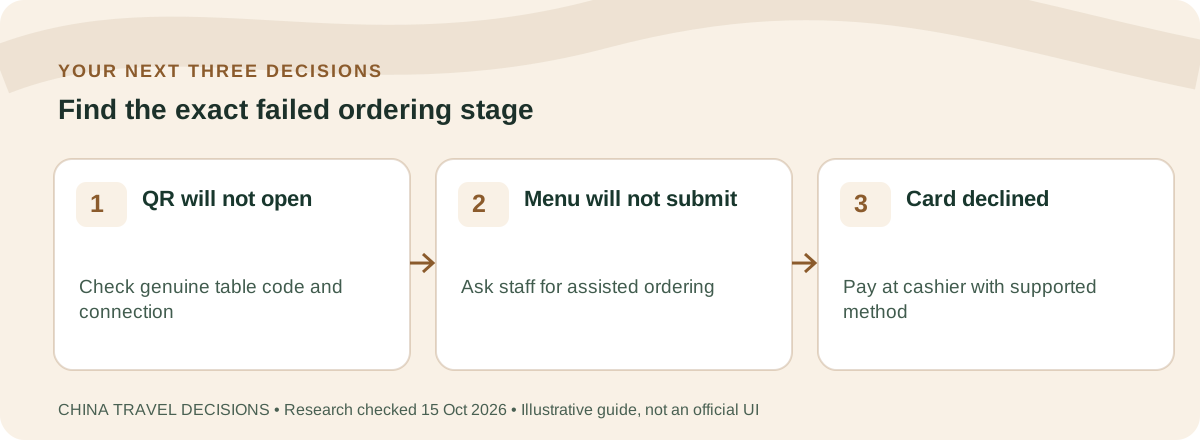
Step one: try the official table code and a working connection
First confirm the QR code belongs to the restaurant and to your current table. If you were sent a QR image online, do not type bank details into a linked web page solely because a stranger said it was “the Chinese ordering site.” Ask staff whether the menu is supposed to open in WeChat, Alipay or the normal camera/browser.
- Use the restaurant-approved scanner and verify the mini program's recognizable merchant name.
- If blank, check that cellular data is actually working; try restaurant Wi-Fi if staff confirm it is legitimate and available.
- Try the restaurant's alternative official QR or paper/menu/photo if staff offer one.
- Ask whether the correct table number was selected before building a cart.
- If you cannot open any menu after one or two attempts, ask for a staffed order rather than spending dinner repeatedly changing phone settings.
App restrictions and network routing vary. We have not completed a firsthand test of a particular restaurant mini program; illustrations in this article are diagnostic flows, not screenshots of a current checkout screen.
Step three: foreign card attached, but in-app payment fails
Shanghai's September 2026 official payment instructions say eligible international cards can be linked to Alipay or Weixin Pay, subject to bank and platform conditions. Linking a card is not a promise that every restaurant mini program supports that card for every product. Some apps use internal merchant acceptance rules.
If the menu accepted your food selection but cannot charge your overseas-issued card, ask to complete the order through a staffed cashier and inquire about an actual foreign-card POS terminal, another supported mobile wallet or RMB cash. Compare WeChat overseas-card decline troubleshooting and physical card and cash backups without assuming the same fix applies to every merchant.
Keep screenshots only of the transaction result and merchant details with identifying data redacted. A bank authorization may remain pending while the restaurant did not receive payment. If in doubt, ask the cashier to verify before repeating.
What to do when food ordering and payment results disagree
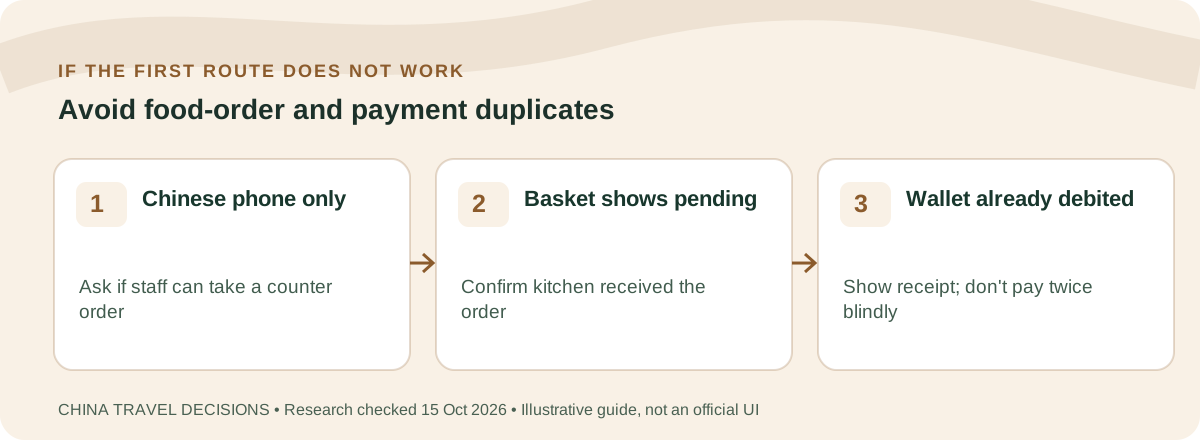
A visible wallet charge does not by itself prove the kitchen accepted your order. Likewise, a table cart marked “submitted” may precede payment confirmation. Ask the cashier whether an order exists for your table and whether the merchant received money. You need two confirmations: the restaurant's order and the wallet's successful charge.
- Write down the table number and dishes; keep the order number if the menu provides one.
- Check whether your wallet says success, processing or failed and whether the bank debit is pending.
- Ask a staff member to check the restaurant's own order record, not just whether the table has food.
- If either record is uncertain, do not pay the same basket again until staff confirm the right corrective action.
- If a legitimate refund is owed, contact the original merchant/wallet through their official support channel and retain the time, masked transaction ID and communication.
In a busy restaurant, a short translated request can be more useful than troubleshooting five settings. Bring up this script: 这桌是否已经下单并付款成功?请帮我查一下,避免重复付款。 (Could you check whether this table's order and payment succeeded? I want to avoid paying twice.)
Wrong dish, missing item or duplicate order: fix the order before you argue about payment
A restaurant problem can exist even when payment worked perfectly. First establish what the kitchen received, then decide whether the fix is to add a missing item, cancel a duplicate, replace the wrong dish or request a refund.
| What happened? | Show staff | Ask for |
|---|---|---|
| Wrong dish arrived | Table number + order/cart screen + dish actually delivered | Confirmation whether the wrong item was ordered or the kitchen served a different item; then replacement/correction as the restaurant permits |
| One item is missing | Order record and items already delivered | Check whether the item is still being prepared, unavailable, or omitted from the kitchen order |
| You accidentally submitted twice | Two order numbers/timestamps if available | Cancel the duplicate before preparation if the restaurant/platform still allows it |
| Merchant says “no order” but wallet shows payment | Masked transaction/order reference, amount and time | Reconcile merchant receipt with wallet status before paying again |
| Refund promised | Original order/payment and the merchant/platform refund record | A written/visible refund status, amount and original payment route; do not treat a verbal “will refund” as money already returned |
- Do not create a second order immediately. A slow kitchen confirmation or delayed mini-program state can turn one problem into a duplicate charge/order.
- Keep the identifiers: table number, merchant, order number, amount, local time and masked transaction reference. Do not publish or hand strangers full bank-card details.
- Let the merchant correct food problems first. A payment wallet can prove or trace a transaction, but it does not decide whether the restaurant served the correct dish.
- For platform orders, use that order's support/refund route. Keep screenshots until the order and payment statuses agree.
- If money is the only remaining problem, move to the payment recovery checklist rather than repeatedly troubleshooting the menu.
Show this to staff
请帮我确认这桌的订单。订单号/付款记录在这里,但现在是【少了一道菜 / 上错菜 / 重复下单 / 已付款但查不到订单】。请先帮我查订单状态,避免我重复付款。谢谢。
Please check this table's order. Here is the order/payment record, but [one item is missing / the wrong dish arrived / the order was submitted twice / I paid but you cannot find the order]. Please confirm the order status before I pay again. Thank you.
Frequently asked questions
Does an overseas eSIM stop WeChat restaurant mini programs?
There is no single rule. Mini program loading can depend on connectivity, account, merchant implementation and network conditions. Test the actual official QR and ask staff rather than assuming your eSIM brand is the cause.
Can I pay by scanning the restaurant's ordinary cashier QR instead?
Possibly, if the restaurant supports it and the cashier can match the amount to the food order. Confirm the restaurant actually receives the payment; don't independently send money to an unknown QR code.
Can I insist on a paper menu?
You can ask; the availability of a paper menu or staffed ordering is restaurant-specific. If no workable route is offered, consider dining elsewhere.
Does a linked Visa or Mastercard guarantee food checkout?
No. Wallet registration, card network support, merchant mini-program rules and payment authorization are separate checks.
Rules and ticket product availability can change. CTD is an independent travel resource, not a government office, a railway operator or a ticket seller. Check the linked official channel before paying, entering China or relying on a reservation.